Migrating to the new playbooks experience
Last updated: September 11, 2026
Who can use this feature
All users with existing playbooks will have their workflows automatically migrated in early August when the new playbooks experience becomes generally available.
What's new in the updated playbooks experience

The new, Beta playbooks experience introduces a redesigned editor and a set of capabilities that give you greater control over how each part of your workflow runs. Key additions include:
Step reordering — Drag and rearrange steps on the canvas without rewriting instructions.
Custom voice and instructions per step — Apply a different voice or a tailored system prompt to individual steps.
Individual step testing — Test any single step in isolation to verify its output before running the full workflow.
Testing with synthetic data — Validate playbook behavior using sample inputs without triggering live data.
Reasoning and temperature controls per step — Tune model behavior at the step level to optimize for accuracy, creativity, or speed.
Nested playbook calls — Call another playbook from within a step, enabling modular, reusable workflow components. Learn more about chaining playbooks here.
Variables are now called inputs — our team has renamed variables to inputs to clarify their purpose.
For a deep dive on using the upgraded playbooks experience, see our article about getting started with playbooks here.
Overview of the migration
As we transition from the legacy playbooks experience to our new, more flexible playbooks experience, WRITER will automatically migrate all of your existing playbooks.

This migration ensures that none of your automated workflows are disrupted. Your playbooks will continue to run exactly as they did before, but they will now live inside our redesigned editor, giving you access to advanced configurations, sandbox testing, and chaining capabilities.
How your playbooks are migrated
To prevent any disruption to your active automations, the migration process is designed to be completely seamless:
Automatic transition: In early August when the new playbooks experience officially launches, all of your existing playbooks will automatically move to the new editor and the legacy playbooks experience will be deprecated.
Single-step consolidation: Because legacy playbooks relied on a single block of instructions, your migrated playbook will initially appear as a
single step on the new editor canvas.
Preserved settings: All of your configured inputs (previously called variables), connectors, and basic settings will be preserved and attached to this single step.
Note: The single-step migration preserves your playbook's execution behavior. No instructions, inputs, or logic are changed during migration.
You don't need to take any immediate action, but we recommend you test your playbook to ensure it works as intended. To ensure the best experience we’re providing grace period.
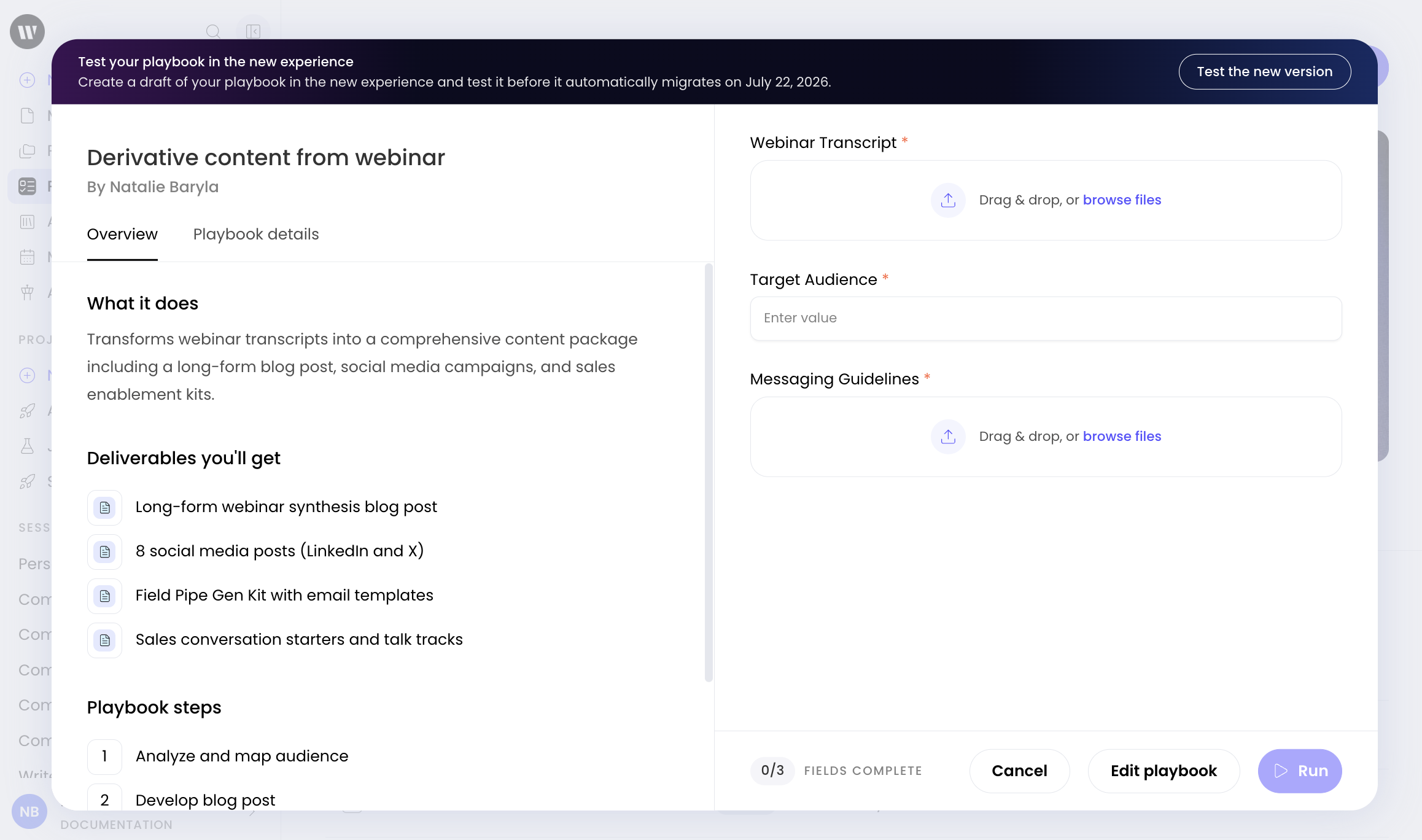
Prior to the official launch you can manually transition any playbook to the new experience by selecting the playbook from the Playbooks page and then selecting the link in the top of the preview.

You can also select Edit playbook and then select Test the new version from the banner at the top.
This will automatically convert the playbook into the enhanced experience as a draft. If anyone outside of the playbook owner or collaborator runs the playbook they will be using the legacy experience. Any triggers you have set will also leverage the legacy experience. Test the playbook in the migrated experience to ensure the steps run correctly prior to publishing it in the updated experience. Once published the updates will apply to anyone using the playbook as well as any triggers that have been set.
How to optimize your migrated playbooks
While your migrated playbooks will work perfectly as a single step, you can unlock the full power of the new experience by breaking your instructions into multiple, modular steps.
Splitting your playbook into steps is most valuable when your workflow includes distinct phases. For example, a playbook that gathers data, then analyzes it, then drafts a summary is a natural candidate for three separate steps. Using multiple steps lets you test and configure each phase independently for more reliable final outputs.
To split a migrated playbook into multiple steps:

Navigate to the Playbooks tab, select your playbook from the list, and from the top banner select Try the new version. This will open your migrated playbook in the new editor. To separate the steps cut the text of a step, scroll to the bottom of the playbook and select Add a step on the canvas to create a new step block and then paste the text from the step you cut. Repeat this process to create a clean, sequential workflow. As you create each step block you’ll notice you will have the option to configure and test each individual step. Learn more about creating and using playbooks here.
💡 Pro tip: Breaking your playbook into multiple steps allows you to use step-level configurations, including reasoning controls, temperature settings, custom voices, and independent testing, to fine-tune each part of your workflow separately.
FAQs
Will my existing playbooks stop working with this update?
No. All of your existing playbooks will be automatically migrated to the new experience. They will remain fully functional and will continue to run without any disruption.
Why does my migrated playbook only have one step?
Legacy playbooks were built using a single prompt block. To ensure your playbook continues to run exactly as it did before, the migration places all of your original instructions into a single step. The output behavior is identical to your pre-migration playbook. You can split these instructions into multiple steps whenever you are ready.
Do I have to split my migrated playbook into multiple steps?
No. If your playbook is running successfully as a single step, you can leave it as is. However, splitting it into multiple steps makes it easier to troubleshoot, test individual parts of the workflow, and apply step-level settings like custom voices or model parameters.
Will my scheduled triggers and webhooks still work after migration?
Yes. All of your existing triggers, routines, and webhooks will remain active and will automatically run the migrated version of your playbook.
What should I do if my migrated playbook produces unexpected results after the update?
Start by opening the playbook in the Editor and reviewing the single step to confirm your original instructions are intact. Use the step testing feature to run the step in isolation and inspect its output. If the issue persists, contact WRITER support for assistance.
For more information see our playbooks support page here.