Chaining playbooks
Last updated: July 16, 2026
Who can use this feature
All users can create and use playbooks.
What are chained or nested playbooks?
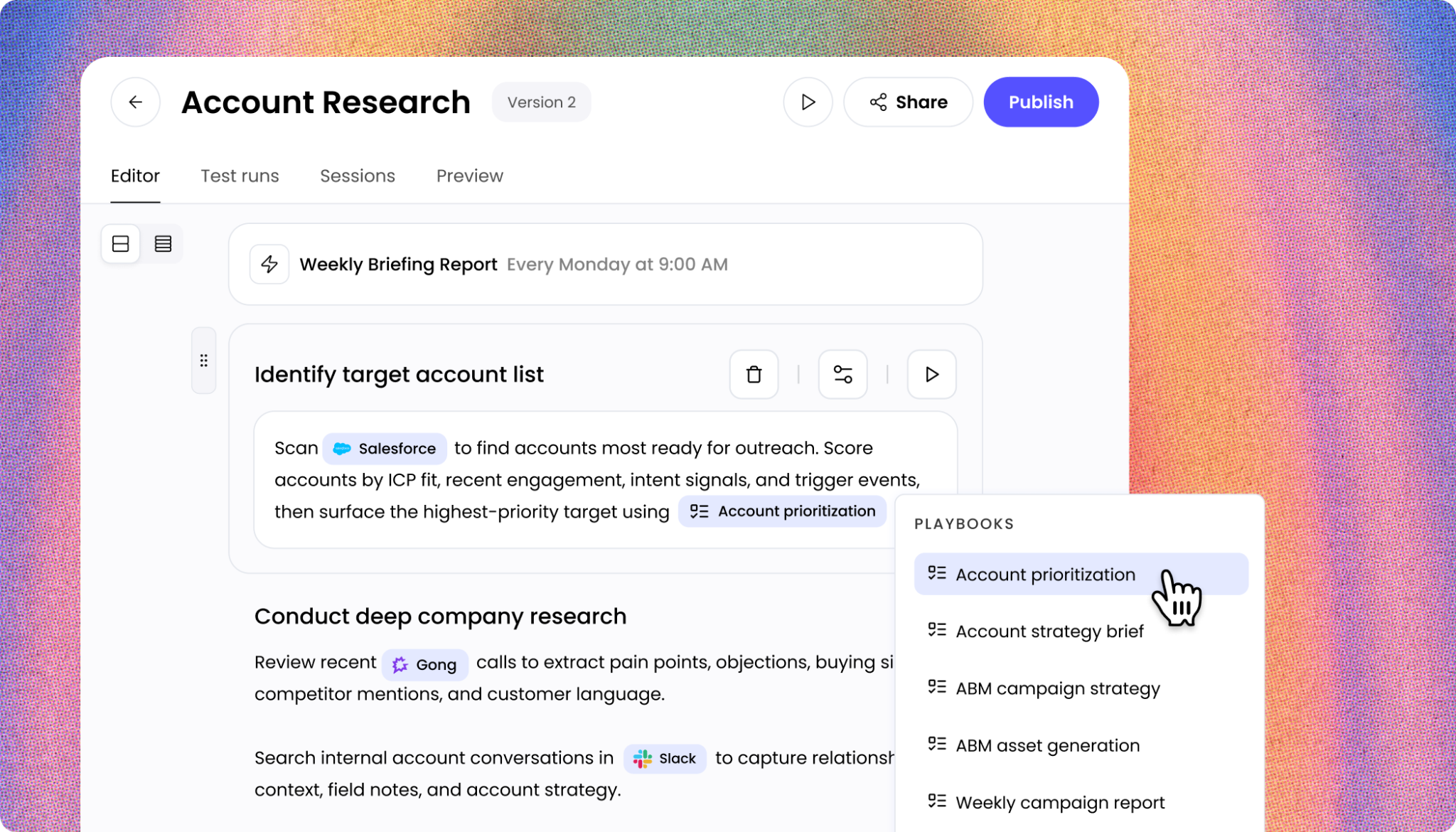
You can nest existing playbooks inside your current playbook to chain complex workflows together. This allows you to modularize your workflows, making them easier to build, test, and maintain. For example, you could have a "Research" playbook that feeds its output directly into a "Drafting" playbook.
A nested playbook (also called a child playbook) is an existing playbook that you call from within another playbook (the parent). The parent playbook orchestrates the overall workflow, and the child playbooks handle discrete, modular steps.
Example workflow:
Parent: "Weekly Market Report"
Child 1: "Research" — searches web sources and extracts key data
Child 2: "Drafting" — writes the report from the research output
Child 3: "Formatting" — applies brand styling and exports the final file
This modular structure makes workflows easier to build, test, maintain, and reuse across different parent playbooks.
Looking to get started using playbooks? See our getting started article here.
When to chain playbooks together vs. use a single playbook
Use chained (nested) playbooks when:
Different steps require distinct skills, connectors, or context files
Individual steps are reusable across multiple workflows
You need to run steps in parallel or use batch processing on one step
The total workflow exceeds what a single context window can reliably handle
Use a single playbook when:
All steps require continuous access to the same files
The workflow is simple enough to execute end-to-end in one session
You need tight control over output quality at each step without handoff gaps
How to call a nested playbook

Open your playbook in the editor and type / in your instructions where you want the nested playbook to run. Select the playbook you want to run as a step from the menu.
Ensure your instructions clearly state what inputs the nested playbook should use and what it should do with the output.
To pass data from a parent playbook into a child playbook, include explicit text instructions in the parent playbook that name the input and its value. For example: "Pass the value of Customer_Name to the child playbook's 'Customer' input." There is no UI field for mapping parent inputs to child inputs as WRITER Agent is built to do this automatically. We recommend adding additional instructions in the parent playbooks to define the mapping clearly.
Passing data from a parent to a child playbook
Child playbooks can accept inputs defined in the parent, but there is currently no UI field for mapping parent inputs to child inputs directly. Use explicit text instructions in the parent step to define the mapping.
How to define the mapping:
Identify the input key in the child playbook (e.g., Customer_Name, Topic, Source_File).
In the parent step's instructions, write a clear mapping statement.
Example:
"Pass the value of
Customer_Name to the child playbook as its Customer input. Pass
Campaign_Brief as its Brief input."
Tips:
Use the exact input key names defined in the child playbook to avoid mapping errors.
Test the child playbook independently with sample input values before nesting it in a parent.
If the child playbook is not receiving the correct values, add more explicit mapping language to the parent step instructions.
File handling across chained playbooks
Files uploaded or generated in one child playbook are automatically available to the parent playbook. If a playbook cannot locate a file, WRITER agent will attempt to search the workspace repeatedly, the tips below will help WRITER Agent locate files passed between your playbooks.
Explicitly name the expected file (e.g., research_output.md) in the downstream step's instructions.
Instruct the upstream step to save its output to a specific, consistently named file.
Design handoff steps whose sole purpose is to confirm a file exists and pass its path forward.
Example upstream instruction (Playbook 1):
"Save your final research summary as research_output.md in the workspace root."
Example downstream instruction (Playbook 2):
"Read research_output.md from the workspace. Use its contents as the basis for drafting."
Files attached at the playbook level
Files attached at the top level of a parent playbook are not always reliably accessible to individual child playbooks.
Best practice: Attach files directly to the specific playbook that needs them, using that step's Context panel. This ensures the file is available when that step executes.
Running batch jobs with chained playbooks
Playbooks support batch execution, where a CSV is used to run a child playbook once per row.
Before starting a batch run
Test with a small subset first. Run 5–10 rows before processing a full dataset to validate output quality and token consumption.
Starting a batch run
In the parent playbook step, attach your CSV as the batch input.
Map CSV column headers to the child playbook's input keys in the step instructions.
Select Run to start the batch.
Stopping a batch run
Once the parent session shows "completed," in-progress child runs cannot be stopped from the parent.
To cancel individual child runs, navigate to the Sessions tab inside the playbook editor and stop them individually.
Best practices for chaining
Structuring complex workflows:
Good: Breaking down a massive task into smaller, modular playbooks and nesting them using the / menu. For example, creating a "Data Extraction" playbook and calling it as step 1 inside your "Weekly Reporting" playbook.
Not as effective: Writing a single 30-step playbook that is difficult to test, troubleshoot, and maintain.
Design for modularity.
Create child playbooks that each accomplish one discrete, testable task.
Name child playbooks clearly so their purpose is unambiguous when selected in the / menu.
Use explicit file naming conventions.
Define a consistent naming convention for files passed between playbooks (e.g., step1_output.md, step2_output.md).
Reference these exact file names in downstream step instructions.
Test child playbooks independently first.
Run each child playbook in isolation with sample inputs before nesting it in a parent.
Use the individual step testing feature inside the playbook editor to isolate and debug a specific step without running the full workflow.
Write self-contained step instructions.
Do not reference other steps by number or position (e.g., "as in Step 2"). Each playbook must contain all the context it needs to execute.
If a later step depends on earlier output, describe what that output should look like and where to find it.
Use single playbooks for file-intensive workflows.
If your workflow requires frequent read/write access to the same files throughout all steps, use a single playbook to avoid workspace isolation issues.
Start batch jobs small.
Always validate a batch run with 5–10 rows before processing hundreds or thousands of rows.
Check your spreadsheet for hidden rows before attaching it as a batch input.
FAQs
Can I use a playbook inside another playbook?
Yes! You can nest playbooks to create modular, chained workflows. Simply type / in your playbook instructions and select the playbook you want to call. This is highly recommended for breaking down complex, multi-step processes into manageable pieces.
What happens if a nested playbook fails?
If the playbook is called as part of a batch processing workflow, then the rest of the processing will continue and you’ll see batch processes missing/failed within the Sessions tab. If it's an integral part of a sequence of steps, WRITER Agent will try to complete the workflow a few times and if it cannot resolve the issue then the overall workflow will pause. You can use the individual step testing feature to isolate the nested playbook, troubleshoot the specific issue, and then resume your workflow.
How do I pass an input from the parent to the child playbook?
There is no UI field for input mapping between parent and child as WRITER Agent will automatically map the inputs between the playbooks. However, specific instructions will help the agent know what to pass where, especially when there are many similar fields or when there are inputs that are then passed on to a child. Write the mapping as explicit text instructions in the parent step — for example: "Pass Topic to the child playbook as its Subject input."
What happens if a child playbook fails?
The parent playbook pauses when a child playbook fails. Use the Sessions tab in the playbook editor to open the child run, review the error, and identify the cause. Fix the child playbook, and return to the parent playbook and start a new session.