Migrate your personal voice to a skill
Last updated: October 27, 2026
Personal voices in Control Center are being deprecated. To preserve your personal voice profile, migrate it to a skill before the deprecation takes effect. A skill packages your voice profile into a reusable capability that you can share with your team and embed in playbooks. Any user role, excluding the limited team member role, can create, edit, and update skills.
Warning: Do not wait until the deprecation takes effect. Migrate your personal voice to a skill now to avoid losing your voice configuration. Once personal voices are deprecated, you will not be able to access or migrate them.
Why migration is necessary
Personal voices in Control Center are being deprecated. Once the deprecation takes effect, personal voice profiles will no longer be available or functional. Migrating your personal voice to a skill ensures your writing style is preserved and remains usable after the deprecation.
A skill is a self-contained package with documentation, scripts, and reference materials that extends what WRITER Agent can do. By migrating your voice to a skill, you make your writing style reusable across your organization and protected from the upcoming deprecation. Learn more about skills in Understanding skills in WRITER Agent.
Note: Org and team voices are being deprecated too, but they migrate to Enterprise Brain — not to skills. If you manage org or team voices, see Migrating org and team voices to Enterprise Brain instead. Personal voices are the only voice type that needs to migrates to a skill.
How to create a skill from your personal voice
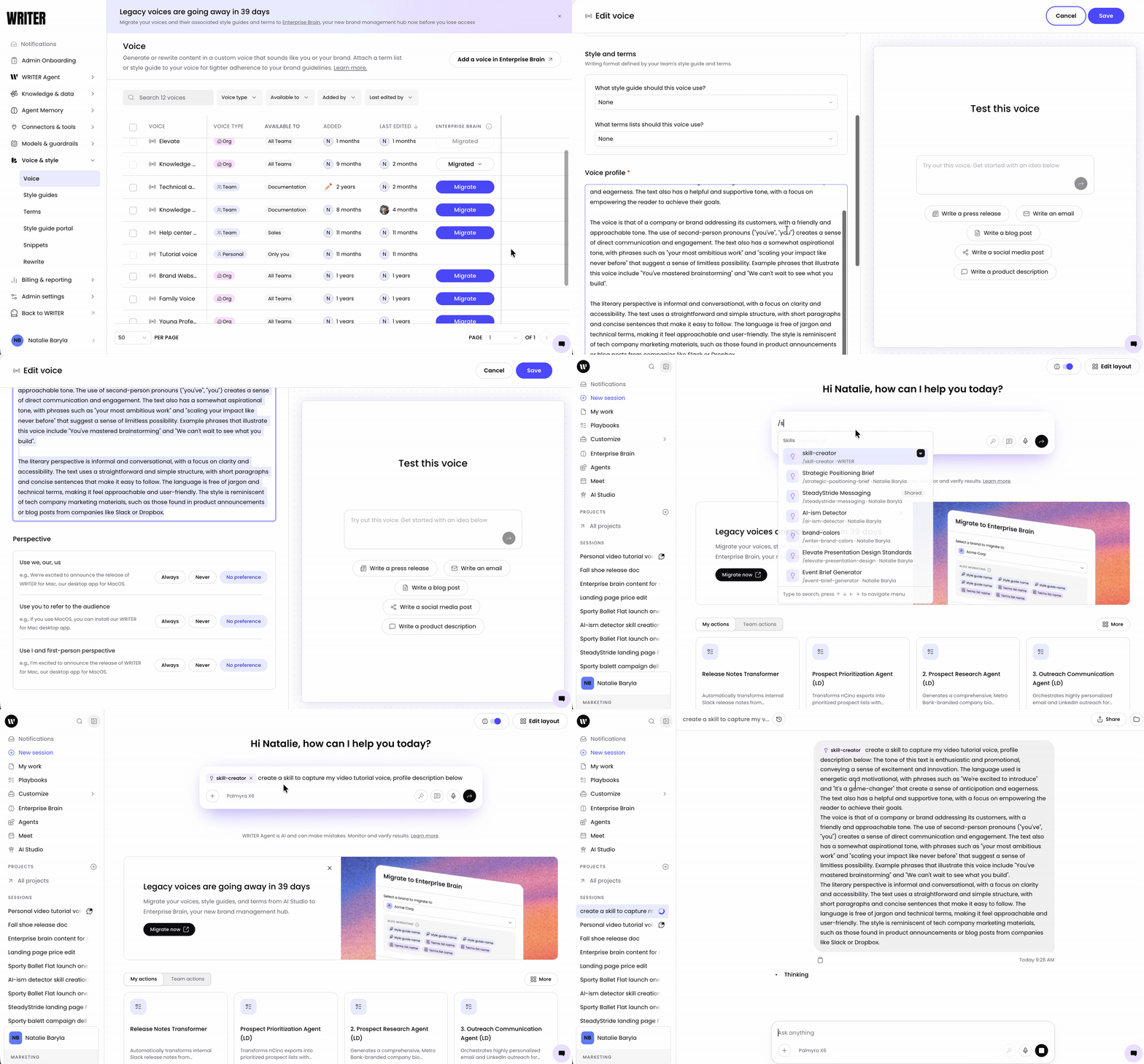
Locate your personal voice in Control Center > Suggestions (legacy) > voice. Select the three dot icon next to the voice and then select edit. Copy the contents of your voice or take a screenshot to upload.
In WRITER Agent, type /skill-creator and ask WRITER Agent to create a skill that captures your voice. Paste your voice profile or upload a screenshot of your voice details. Submit your prompt
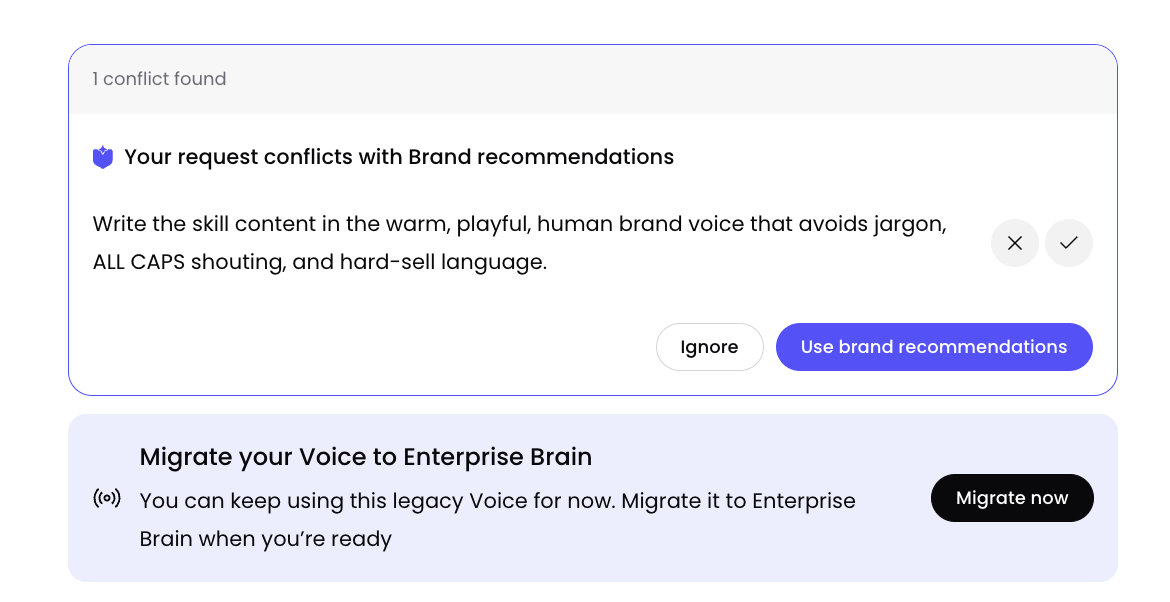
You may see a message that your voice conflicts with a brand setting, this is expected if your tone and style are not identical to the voices configured in your brands. Select the check mark to proceed with your skill creation.
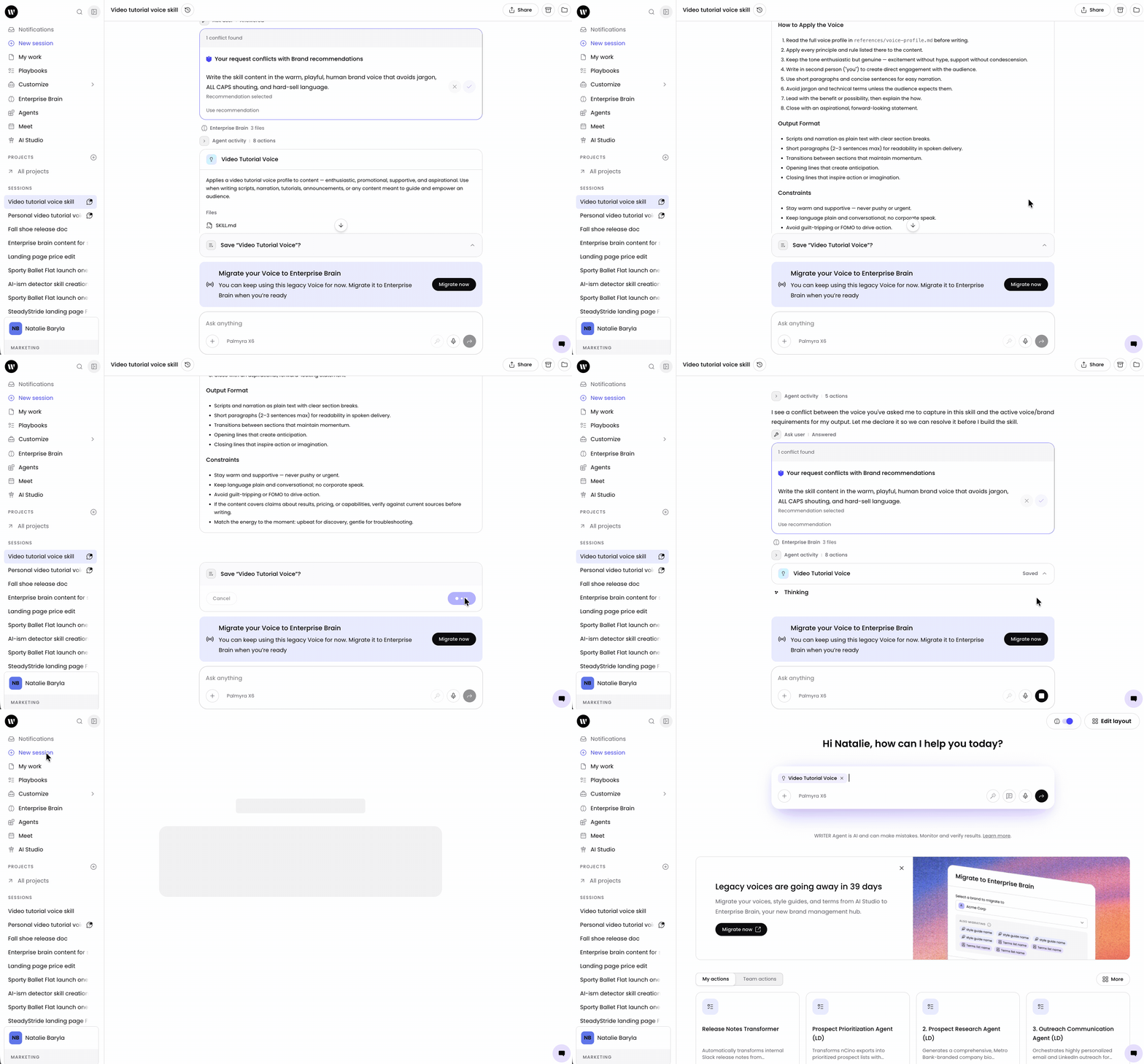
Review the generated SKILL.md content to confirm it accurately captures your voice profile, including tone, style, vocabulary, and perspective settings. If adjustments are needed, refine the skill description in the chat session and regenerate. Select Save when you are satisfied with the skill.
How to share your voice skill with your team
Once the skill is created, share it so your team can use it.
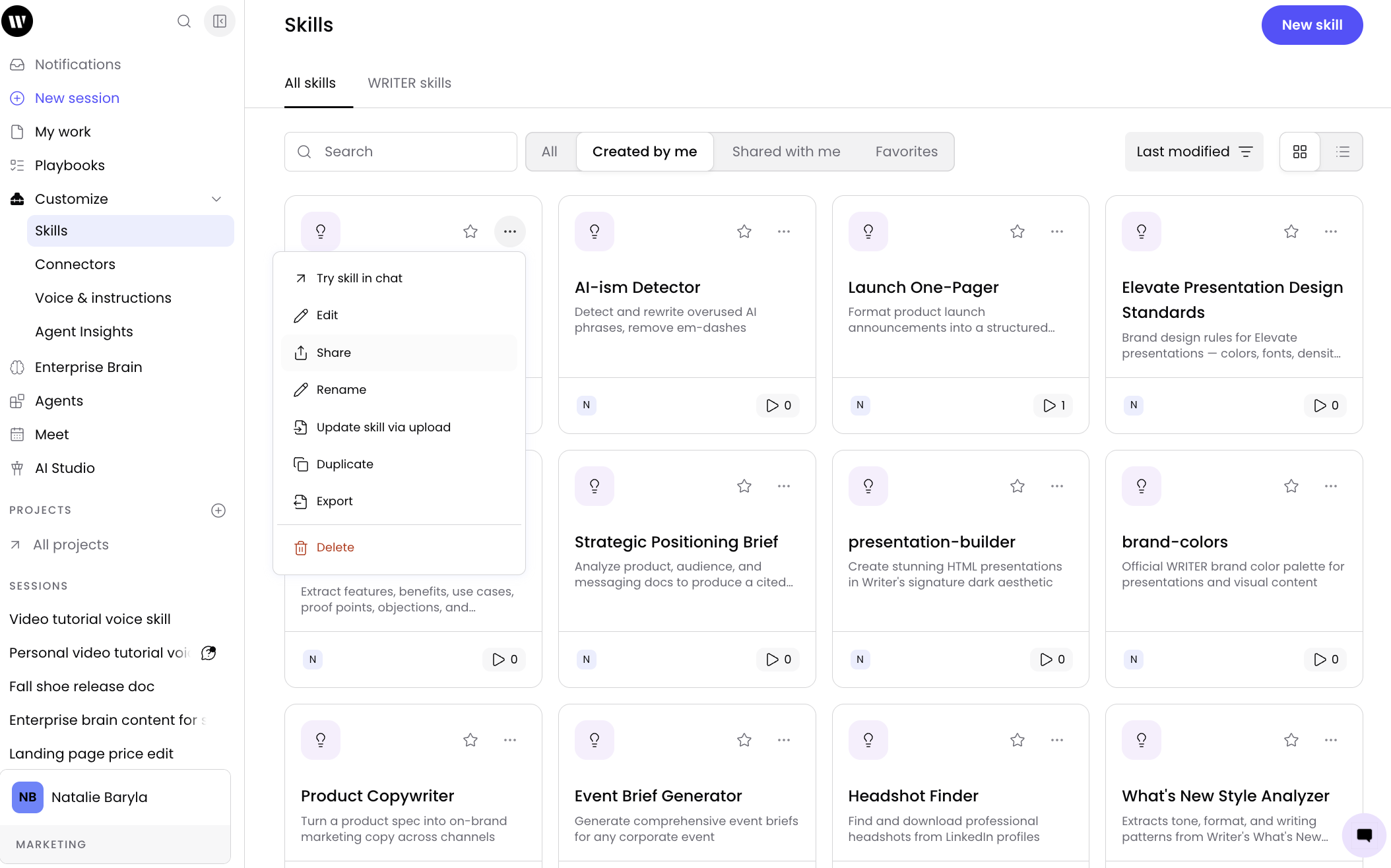
Go to Customize > Skills.
Select the ••• menu on the skill you want to share, then select Share.
Select who to share the skill with — individuals or entire teams.
Select Share.
Those you shared with will find the skill within Skills > Shared with me. They can invoke it in any WRITER Agent session using the / menu or by selecting it from the + menu.
What about style guides and terms connected to your personal voice?
A skill does not automatically inherit the style guide and terms connected to your personal voice. Style guides and terms apply to WRITER Agent outputs only when connected to a voice profile, and a skill is a separate object type.
If your personal voice has a connected style guide or terms, include the relevant style and terminology guidance directly in the skill's SKILL.md instructions so WRITER Agent applies them when the skill is invoked. Copy the key rules from your style guide and the critical terms from your terms set into the skill description when creating it, or paste them into the SKILL.md content after generation.
Note: Org and team style guides and terms migrate to Enterprise Brain automatically when the connected voice is migrated. Personal voices are the exception, they migrate to skills, not Enterprise Brain, so connected style guides and terms do not carry over automatically.
Troubleshooting
My migrated skill does not sound like my personal voice. What should I check?
Confirm that the SKILL.md content accurately captures your voice profile. Open the skill in the editor and compare the tone, style, vocabulary, and perspective settings against your personal voice profile. If they do not match, edit the skill description and regenerate, or manually adjust the SKILL.md content. If your personal voice is still available in Control Center, review the voice profile side by side with the skill before the deprecation takes effect.
The skill is not applying my style guide and terms. Why?
Style guides and terms apply to WRITER Agent outputs only when connected to a voice profile. A skill does not automatically inherit the style guide and terms connected to your personal voice. Include the relevant style and terminology guidance directly in the skill's SKILL.md instructions so the agent applies them when the skill is invoked. See What about style guides and terms connected to your personal voice? for details.
My team members cannot see the shared skill. What should I check?
Confirm that you shared the skill with the correct individuals or teams. Team members should look in Skills > Shared with me. If the skill does not appear, verify the team membership and that the recipients have Control Center access.
My personal voice is no longer available in Control Center. What should I do?
If your personal voice has already been deprecated and is no longer accessible, you will need to recreate the voice configuration from scratch. Use the same example content and style descriptions from your original voice to build a new skill directly in WRITER Agent You will not be able to recover or migrate the original voice profile after deprecation.
The skill works in chat but not in my playbook. What should I check?
Confirm that the skill has been added to the playbook. In the playbook editor, locate the Skills section in the right-hand settings panel and add the skill. Alternatively, reference the skill using the / menu directly in the playbook step text. Skills are not loaded until they are invoked during playbook execution.
I see a conflict message between my voice and a brand setting. Is this a problem?
No. This is expected if your personal voice tone and style are not identical to the voices configured in your organization's brands. Select the check mark to proceed with your skill creation. The skill captures your personal voice, which may differ from the org-level or team-level brand voice — that's normal.
FAQs
Why are personal voices being deprecated?
Personal voices are being migrated to a new system. Skills provide a more flexible and shareable way to package your writing style. Skills can be shared with individuals or teams, embedded in playbooks, and managed independently of the deprecated voice system.
What happens if I do not migrate my personal voice before deprecation?
Your personal voice profile will no longer be available or functional. You will not be able to access, edit, or migrate it. To preserve your writing style, migrate to a skill before the deprecation takes effect.
Does migrating my personal voice to a skill delete the original voice?
No. The personal voice remains available during the transition period. However, once the deprecation takes effect, the personal voice will no longer be accessible. The skill continues to function independently after deprecation.
Can I migrate multiple personal voices into a single skill?
Yes. You can describe multiple voice profiles in the skill creation prompt. However, for clarity and consistent results, create a separate skill for each voice so each one can be invoked independently.
Can I set a voice skill as the default for my team?
A skill cannot be set as a default voice directly. However, you can embed the skill in a playbook that your team runs for specific workflows.
Do I need to migrate org and team voices to skills too?
No. Org and team voices migrate to Enterprise Brain, not to skills. Only personal voices migrate to skills. If you manage org or team voices, see Migrating org and team voices to Enterprise Brain.
To learn more, see:
Understanding skills in WRITER Agent or Migrating org and team voices to Enterprise Brain.