How to configure Agent Memory for your organization
Last updated: August 13, 2026
WRITER Agent’s memory layer learns from each session and applies that context to future work. Org admins and IT admins configure memory storage for their organization. This configuration controls whether memory insights are visible to end users in WRITER Agent.
Agent Memory is currently in an opt-in Beta phase. The functionality has been deployed to WRITER and is turned off by default for all customers. Our team is planning to enable this feature for all enterprise orgs with WRITER-managed storage at the end of August 2026, admins can opt-out by turning the feature off at any time in AI Studio.
Before you begin
Agent memory is stored in a graph database. Before configuring it for your organization, review the following requirements and considerations.
Select between two hosting options:
WRITER managed — WRITER hosts and operates the database. No additional setup is required.
Self managed — This feature is coming soon. You select a database provider and connect to it. This option requires you to set up a graph database before configuring memory in WRITER.
Warning: If you switch your storage setup later, existing data won't be migrated. Choose your hosting option carefully before completing configuration.
How to configure Agent Memory with WRITER-managed storage
With WRITER-managed storage, WRITER hosts and operates the database for you. This option requires no additional infrastructure.
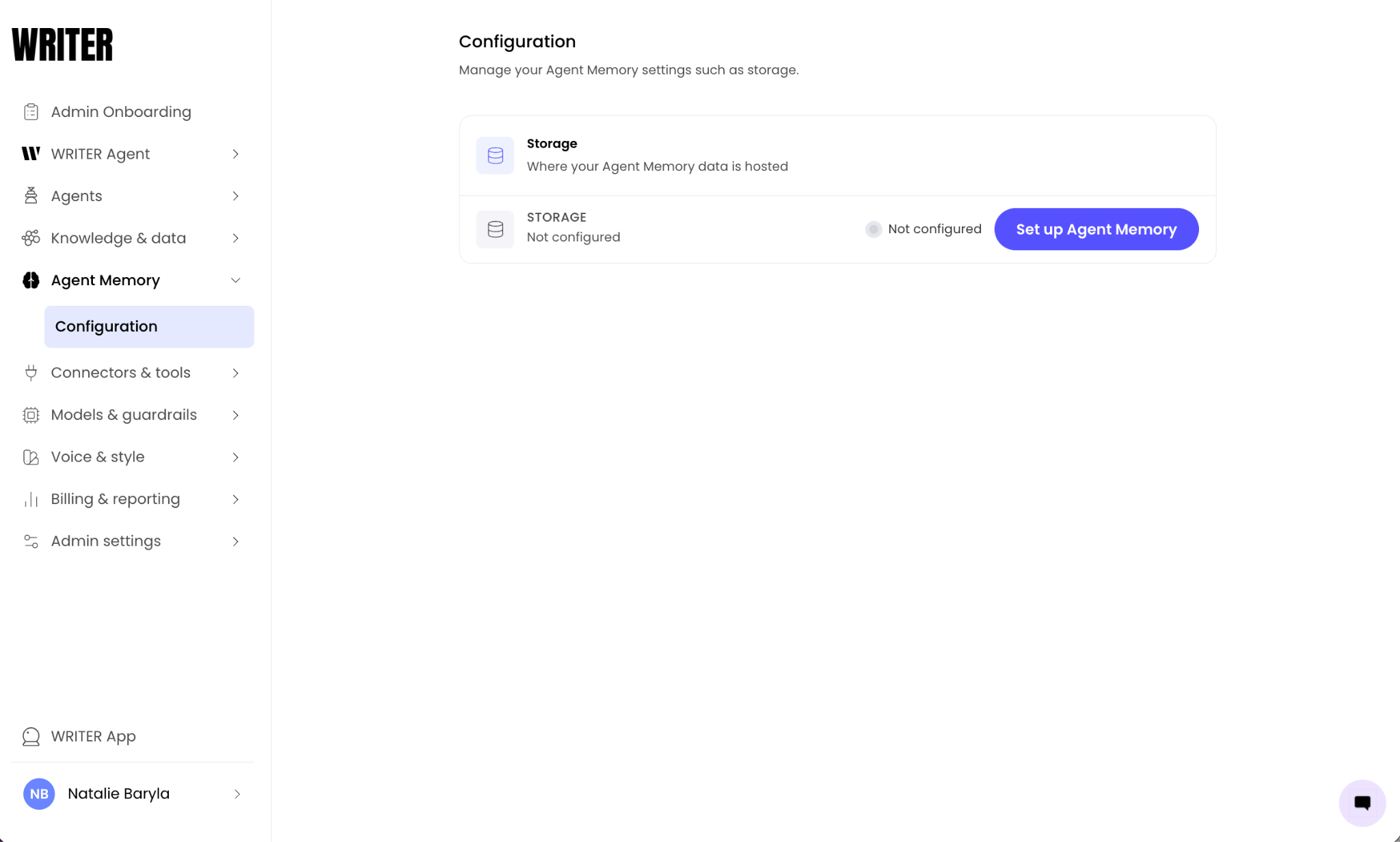
Navigate to AI Studio >Agent Memory > Configuration and select Set up Agent Memory
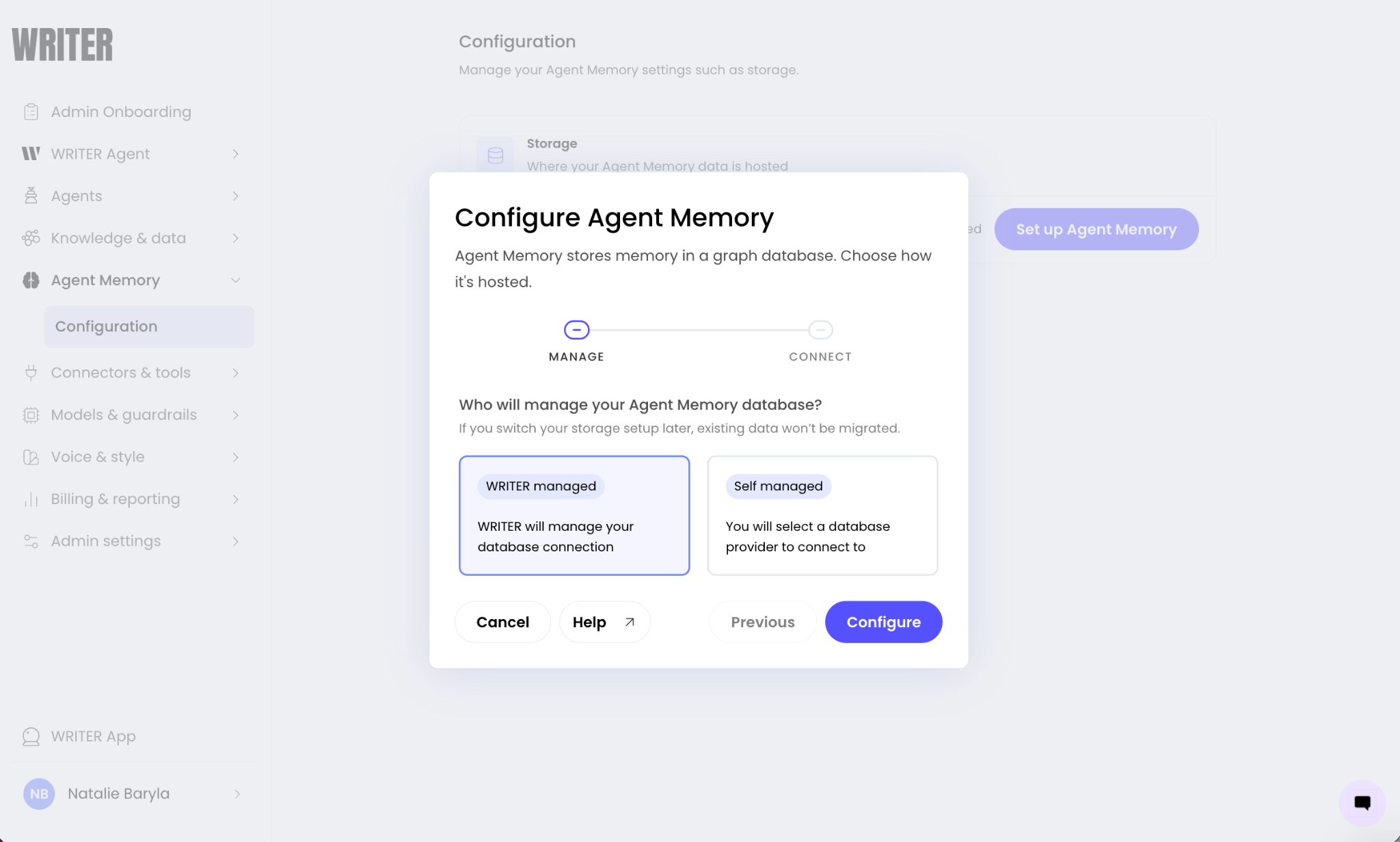
Select WRITER managed from the modal and then select Configure to save your changes.
Note: our team is currently working to finalize self-managed storage and will release that functionality shortly.
Managing Agent Memory configuration
After Agent Memory is configured, you can manage the storage settings from the Configuration page.
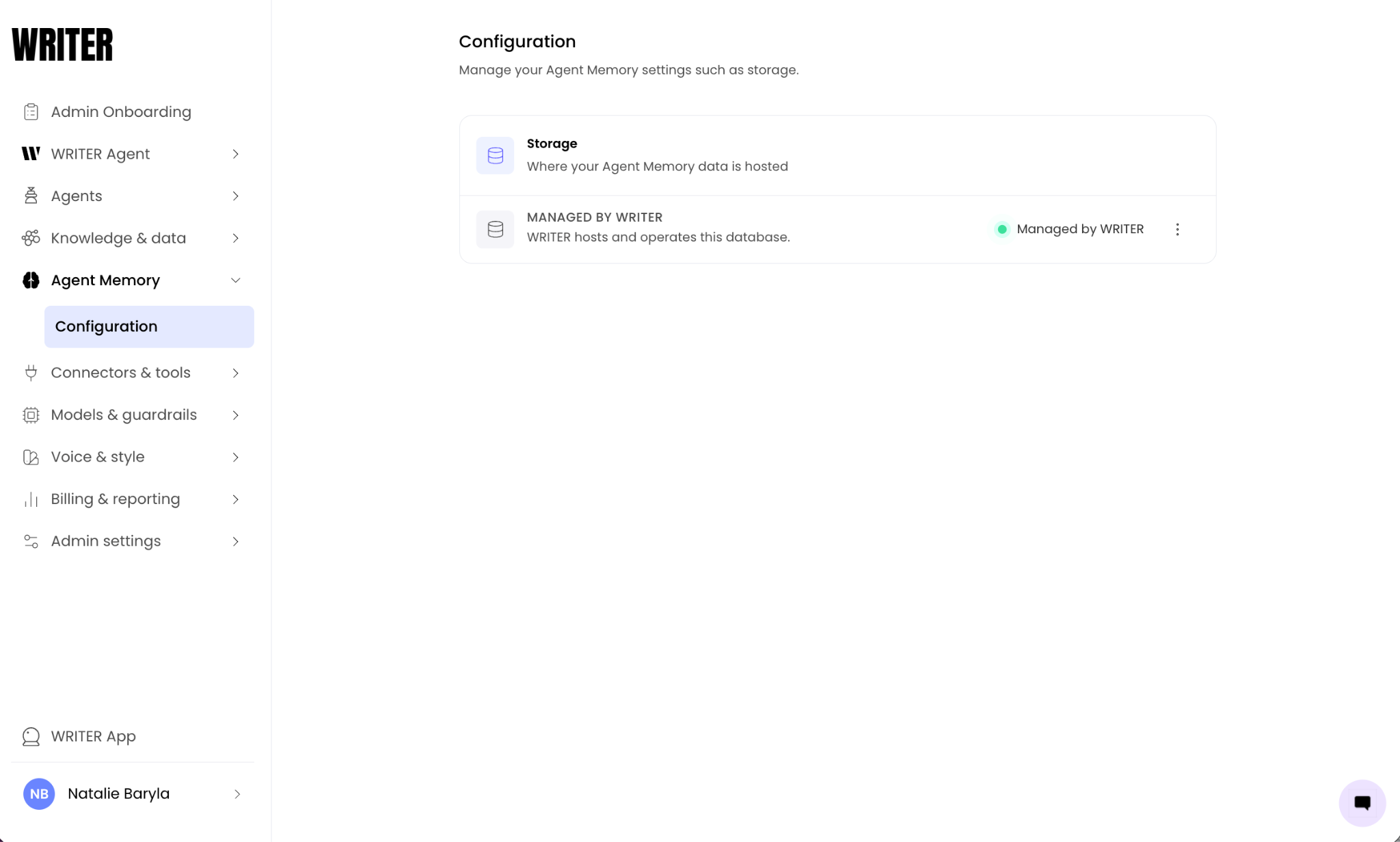
Navigate to AI Studio > Agent Memory to review the current storage status in the Storage section.
The Storage section displays your hosting option (MANAGED BY WRITER or your self-managed provider) and a description of the current setup. Select the menu to the right of the connection to edit or remove it.
Warning: Switching your storage setup after configuration won't migrate existing data. If you change from WRITER-managed to self-managed, or vice versa, previously stored memories won't carry over.
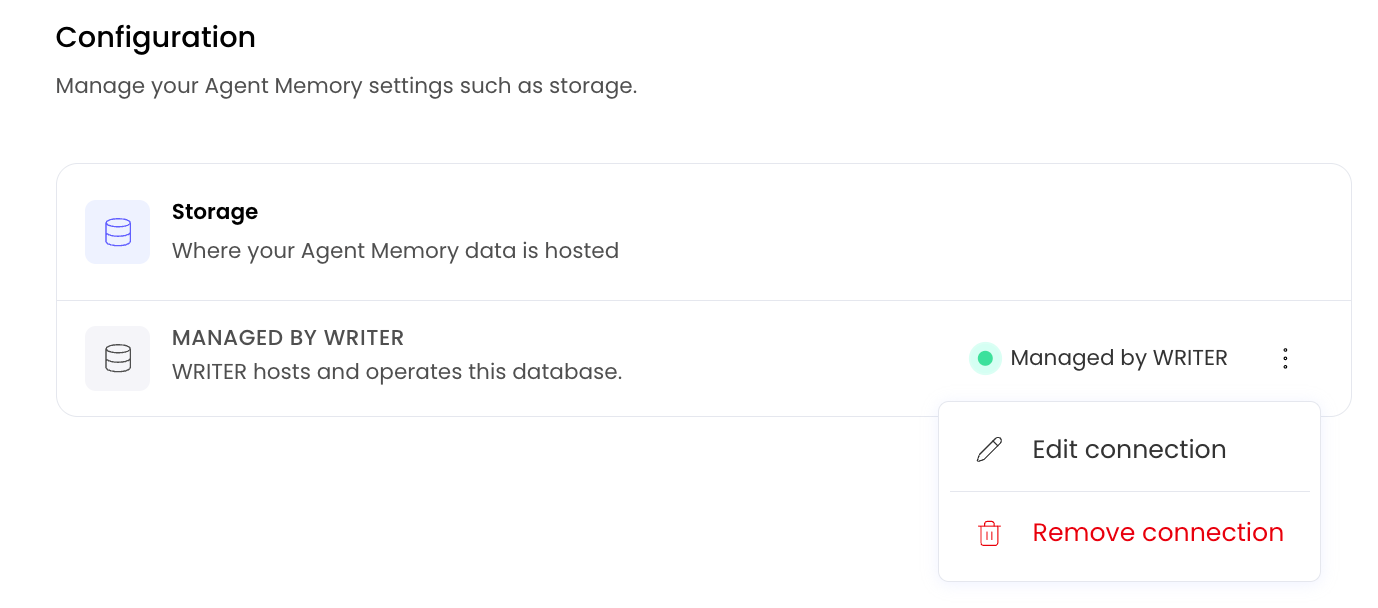
You can disable Agent Memory at any time by selecting Remove connection from the three dot menu.
What end users see after configuration
Once an admin configures Agent Memory, end users in the organization can access memory insights in WRITER Agent.
End users see the following:
Agent insights in the Customize section of the left menu of WRITER Agent, which displays two sections:
Insights into your work — patterns observed from the user's sessions
What WRITER Agent knows about you — preferences, working style, and details about the user's work gathered from sessions
The memory pill in WRITER Agent sessions, which opens the memory panel and shows the specific memories used to generate a response
Learn more here.
Limiting Memory with WRITER Agent profiles
Org and IT admins can enable or disable Agent Memory for specific teams using WRITER Agent profiles. WRITER Agent profiles give you the ability to create customized versions of WRITER Agent tailored to specific teams within your organization, learn more here.
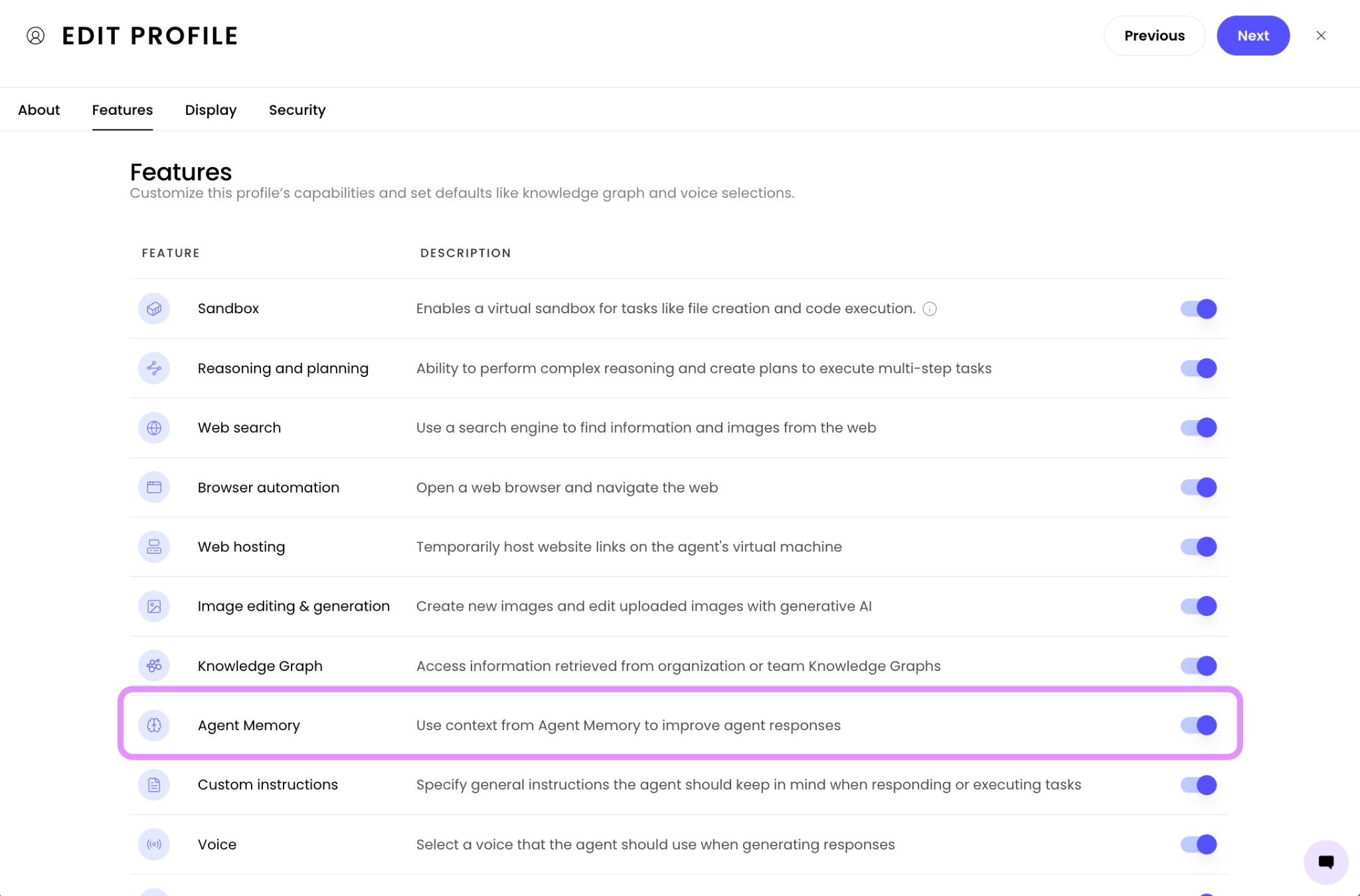
Within the Features tab of the agent profile settings toggle the setting to the right of Agent Memory to off and complete the profile setup process.
Troubleshooting
Memory insights show an error in WRITER Agent
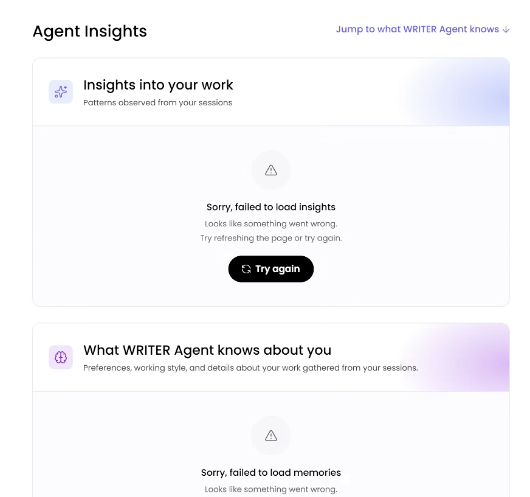
If end users see "Sorry, failed to load insights" or "Sorry, failed to load memories" on the Agent insights page, the Agent Memory configuration may be incomplete or the database connection may have failed.
Navigate to AI Studio > Agent Memory > Configuration.
Verify that the Storage section shows a configured status (MANAGED BY WRITER or your self-managed provider).
If the configuration appears incomplete, reconfigure Agent Memory using the steps in this article.
For self-managed storage, verify that the database is running and that the connection details are correct.
If the error persists, contact our support team.
Insights are empty after configuration
If the Memory insights page shows "No insights yet" after configuration, this is expected when Agent Memory has just been enabled. WRITER Agent needs to complete several sessions before it can surface patterns and memories. Encourage users to continue working in WRITER Agent so it can learn more about their work.
FAQs
Who can configure Agent Memory for an organization?
Org admins and IT admins can configure Agent Memory.
What is the difference between WRITER-managed and self-managed storage?
With WRITER-managed storage, WRITER hosts and operates the database. No additional setup is required. With self-managed storage, you select a database provider and connect to a graph database that you host and operate, giving you control over where your memory data is stored.
Can I switch from WRITER-managed to self-managed storage, or vice versa?
You can change your storage setup from the Configuration page, but existing data won't be migrated. Previously stored memories won't carry over to the new storage setup.
Does configuring Agent Memory affect existing WRITER Agent sessions?
Configuring Agent Memory enables memory insights for new and existing end users. Existing sessions aren't modified, but WRITER Agent will begin learning from sessions going forward.
Is Agent Memory data used to train models?
No. Agent Memory data isn't used to train models.
Can end users disable Agent Memory for their own sessions?
End users can turn on Incognito mode within a WRITER Agent session to pause memory for that session. When Incognito mode is on, WRITER Agent won't store context or learn from the chat for future sessions. Standard session logging and observability continue as usual, managed by the admin.