Guardrails
Last updated: September 28, 2026
Who can use this feature
Supported on Enterprise plans
IT admins are able to select and manage models via AI Studio. .
Guardrail overview
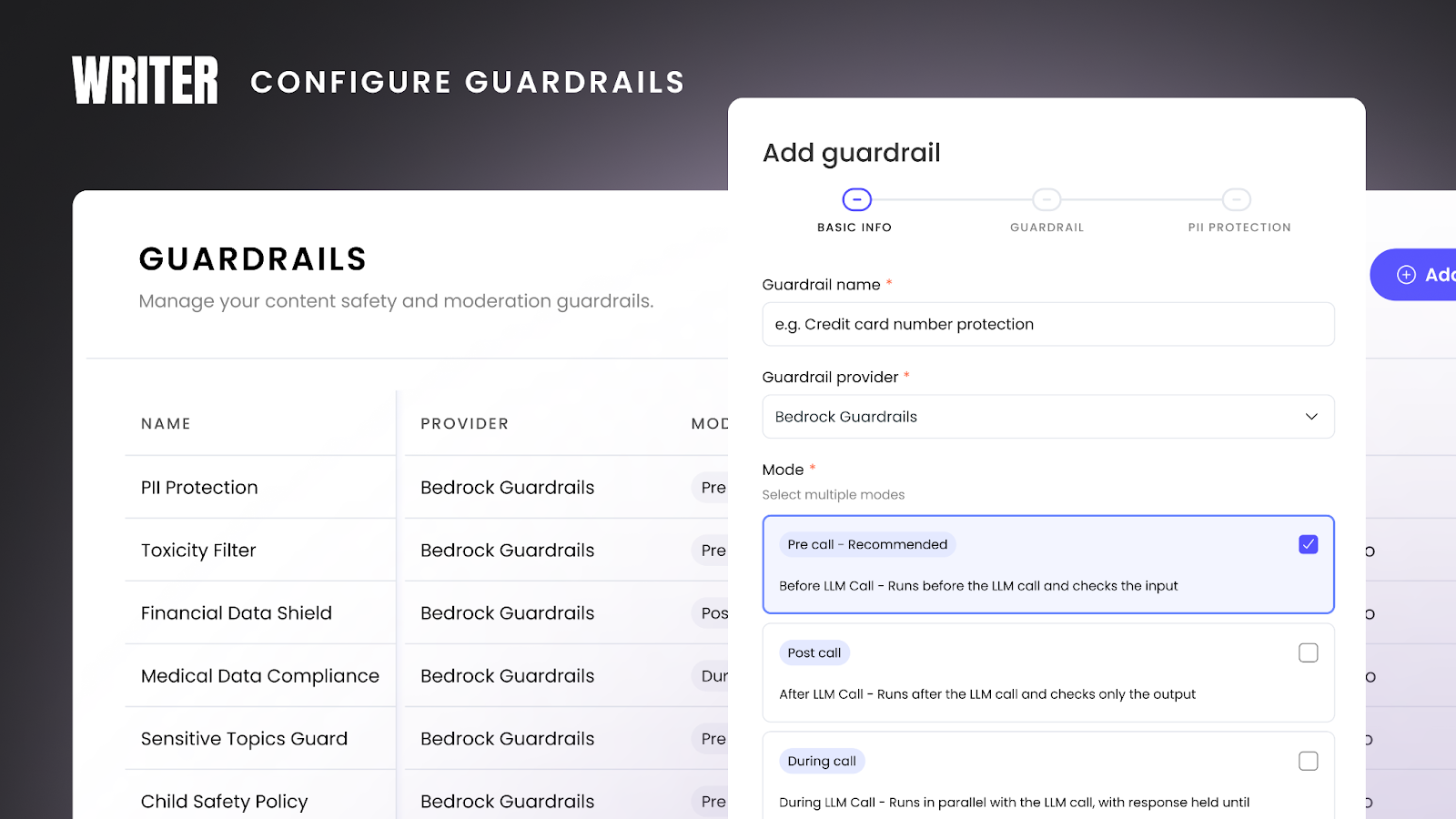
Ensure safe and compliant agent actions at scale, reducing reputational and financial risk. AI Studio is your central hub to create, manage, and enforce guardrails at the model and agent level, enabling granular enforcement and auditability. Integration with third parties, such as Amazon Bedrock, Azure Prompt Shield, and Azure Text Moderation, to support consistency with existing systems and centralized management. For full technical details about guardrails in AI Studio, see our dev docs here.
What are guardrails?
Guardrails are safety and compliance controls that monitor and filter AI agent inputs and outputs. They help you:
Prevent sensitive data leaks (PII, financial data, health information)
Block toxic, harmful, or inappropriate content
Enforce compliance with regulations (HIPAA, GDPR, PCI DSS)
Maintain brand safety and reputation
Audit all AI interactions for security and compliance
Guardrails run at different stages of the AI interaction and can be configured to block content, log violations, or both.
Why use guardrails?
Risk Mitigation: Automatically prevent data leaks, toxic outputs, and compliance violations before they reach users.
Centralized Control: Configure guardrails once and apply them across multiple agents and teams.
Compliance Enforcement: Meet regulatory requirements with automated content filtering and detailed audit logs.
Brand Protection: Ensure all AI outputs align with your organization's values and policies.
Adding guardrails
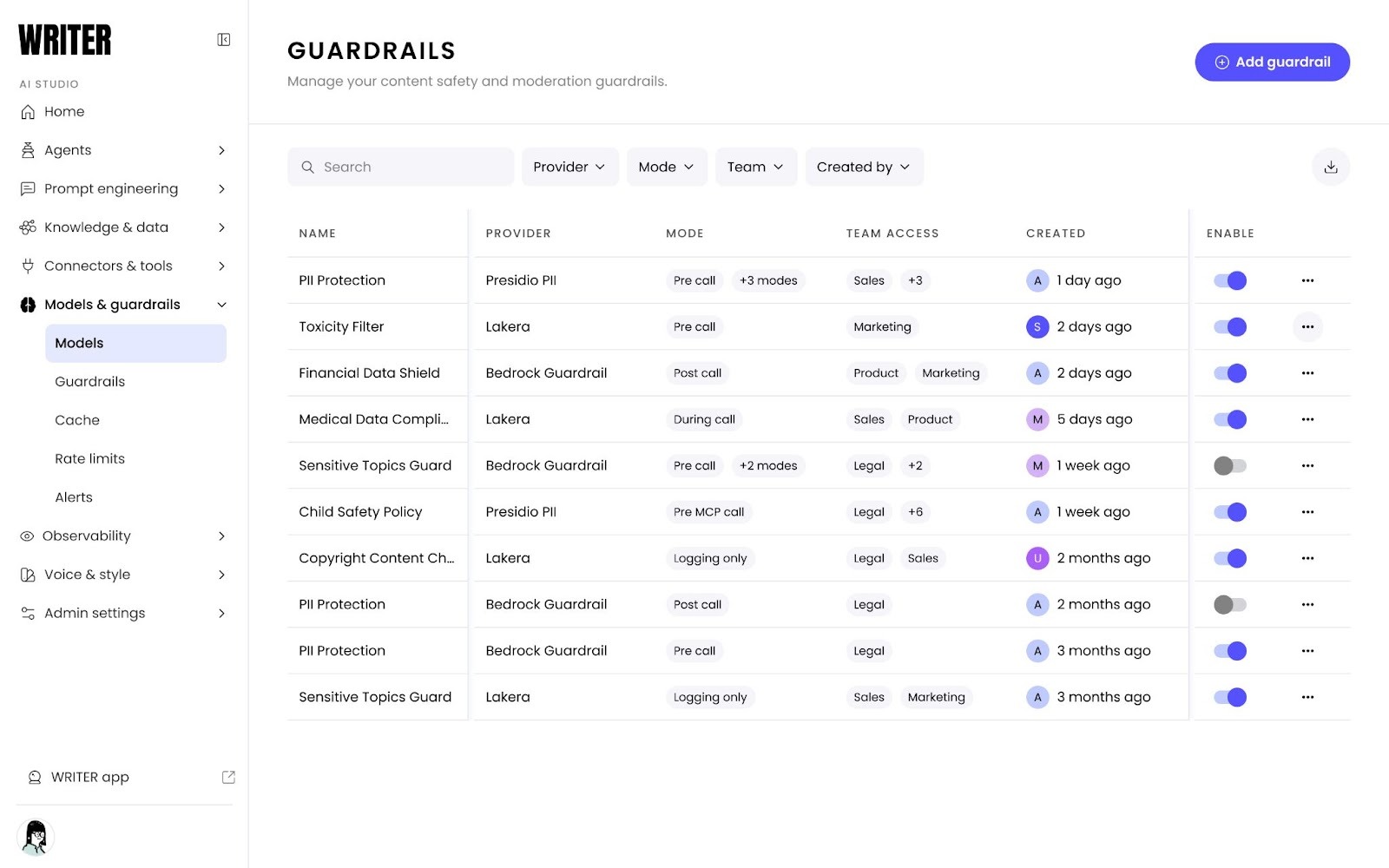
From AI Studio navigate to Models & Guardrails > Guardrails > +Add guardrail to get started.
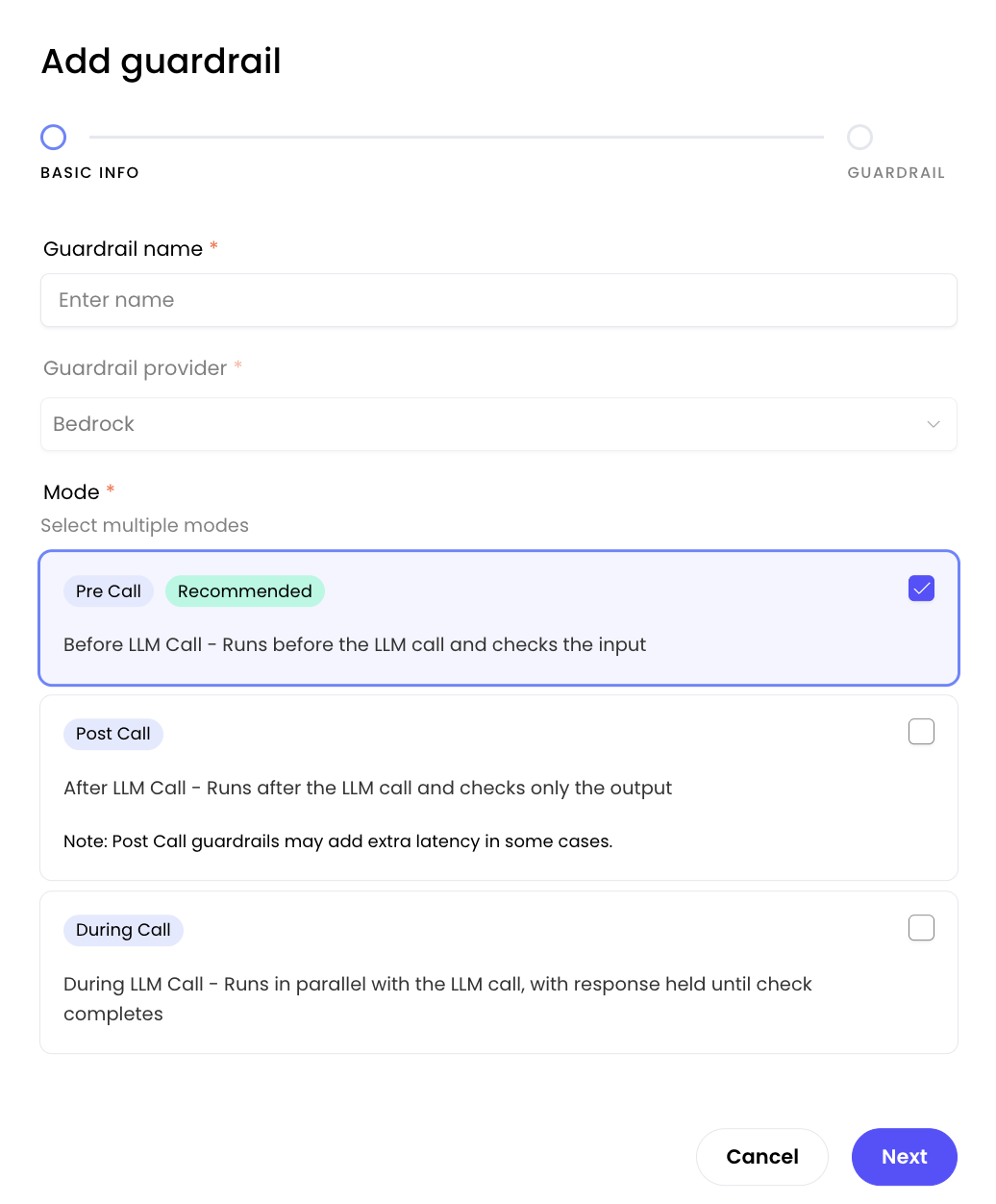
Once you’ve launched the modal for adding a guardrail you will be taken through various steps where you will need to add credentials from your guardrail provider. Please take a look at our dev docs for more details here.
Understanding guardrail modes
Guardrails can run at different stages of the AI interaction. You can select multiple modes for comprehensive protection.
Pre-call mode
When it runs: Before the LLM processes the request
What it checks: User input only
Use cases:
Prevent users from submitting PII (credit cards, SSNs)
Block toxic or harmful prompts
Filter sensitive topics before processing
Stop prompt injection attacks
Benefits:
Prevents unnecessary LLM calls (saves costs)
Fastest response time when content is blocked
Protects against malicious input
Example:
User input: "My credit card number is 1234-5678-9012-3456"
→ Guardrail blocks before LLM sees it
→ User receives: "Please don't include sensitive financial information"
Post-call mode
When it runs: After the LLM generates a response
What it checks: LLM output only
Use cases:
Ensure LLM doesn't generate PII
Filter inappropriate responses
Catch hallucinations about sensitive topics
Verify compliance of generated content
Benefits:
Catches issues in LLM-generated content
Ensures brand-safe outputs
Compliance verification
Example:
LLM generates: "Sure, you can reach our CEO at 555-0123"
→ Guardrail detects phone number pattern
→ Response blocked or PII redacted
→ User receives safe version or error message
During-call mode
When it runs: In parallel with the LLM call
What it checks: Can monitor both input and output in real-time
Use cases:
Real-time content monitoring
Concurrent safety checks
Streaming response filtering
Benefits:
Doesn't add sequential latency
Good for streaming responses
Parallel processing
Trade-offs:
More complex to configure
Response held until check completes
May impact overall response time
Example:
While LLM processes request, guardrail analyzes input
→ Both complete simultaneously
→ Results combined before user sees response
Combining multiple modes
You can select multiple modes for comprehensive protection. Example:
Pre-call + Post-call
Maximum protection: filters both input and output
Higher latency but strongest safety
Best for: High-risk applications (healthcare, finance)
Managing guardrails
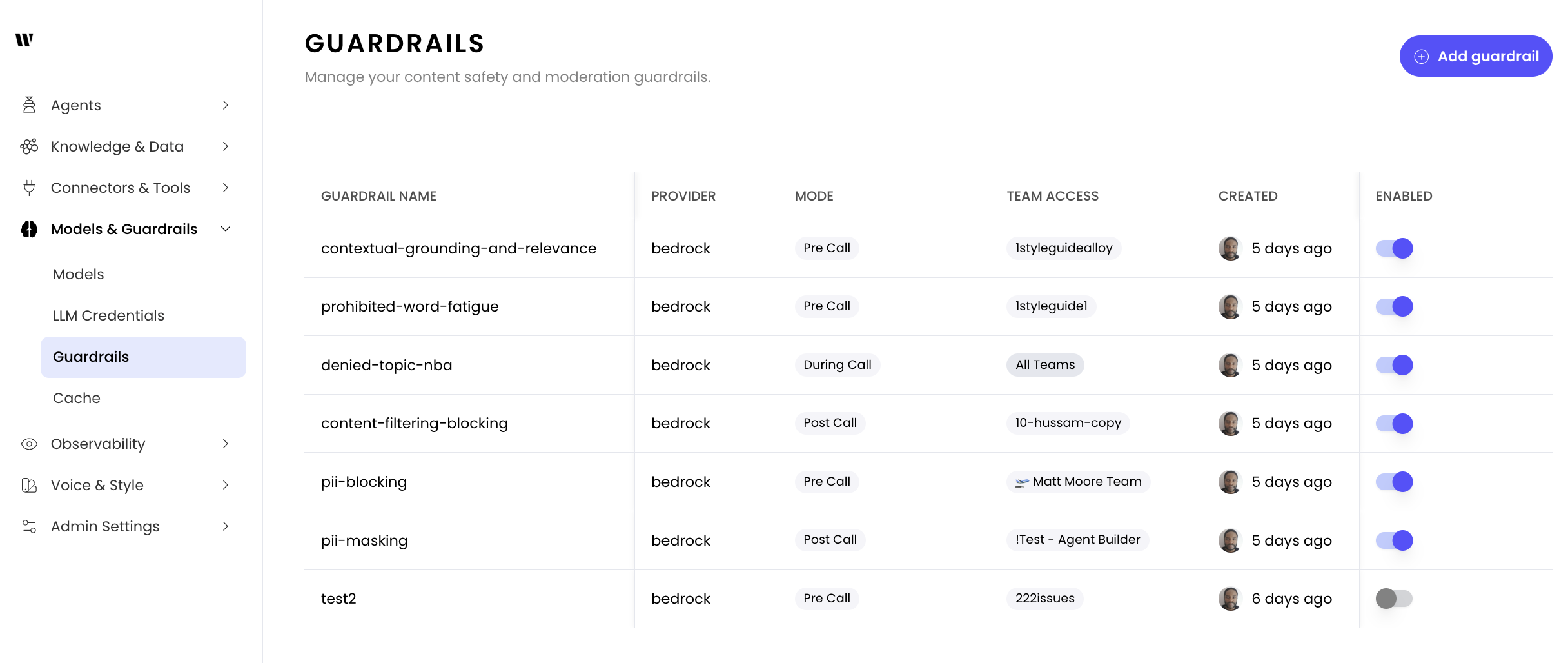
Once you’ve completed the guardrail set up process you’ll be able to manage it from the list by selecting the three dot icon on the right. From here you can edit or delete the guardrail. To learn more please see our dev docs.
Deleting a guardrail
⚠ Warning: Deleting a guardrail removes it from all agents using it. Agents will continue to operate as designed, but without the guardrails.
To delete a guardrail:
Click the three-dot menu
Select Delete
Enabling/disabling guardrails
You can temporarily disable a guardrail if you’d like to remove it from your agents without having to recreate the configuration. Agents will continue to run without the guardrail check until it is re-enabled.
Best practices
Choosing the right guardrail mode
For customer-facing agents:
Use Pre-call + Post-call for maximum protection
Enable PII protection and toxic content filtering
Set up monitoring and alerting for compliance teams
For internal agents:
Pre-call mode may be sufficient for most use cases
Upgrade to blocking modes after reviewing logs and identifying needs
Consider Post-call for sensitive internal data
For development/testing environments:
Test with realistic scenarios that match production use cases
Gradually enable blocking modes as you refine configurations
Recommended guardrail combinations
Healthcare/HIPAA compliance:
PII Protection (Pre-call + Post-call)
Medical Data Compliance (Post-calll)
Financial services:
PII Protection (Pre-call)
Financial Data Shield (Post-call)
Sensitive Topics Guard (Pre-call)
General business:
Toxicity Filter (Pre-call)
PII Protection (Pre-call)
High-security environments:
Enable all protection types
Use Pre-call + Post-call modes
Implement strict team access controls
Regular audit log reviews
FAQs
What will agent users experience if they run into a guardrail?
The user experience differs by agent and guardrail type. The error shows the configured error message (configured in the third-party guardrail provider). WRITER no-code agents will surface it as an error. In the API, you’ll get an error message back with these details. In chat agents users will see a message in the dialog window explaining the error. Here is an example

What happens in streaming vs. non-streaming responses?
Guardrail modes behave differently with streaming responses:
During-call: Checks input in parallel with the LLM. If the check finishes before the LLM starts outputting, streaming begins immediately. If the check takes longer, streaming is delayed until the check completes—but output chunks aren’t buffered.
Post-call: Collects all response chunks, assembles the complete response, runs the guardrail check, then delivers the chunks. The user doesn’t receive any chunks until the guardrail check completes, so streaming latency is higher than non-streaming.
For latency-sensitive streaming applications, prefer during-call mode for input validation over post-call output checking when possible.
Can I use multiple guardrail providers at the same time?
Yes you can use all currently available providers: Amazon Bedrock, Azure Prompt Shield, and Azure Text Moderation.
Do I need to be a Bedrock or Azure customer in order to set up guardrails?
Yes, at this time guardrails are only available through Amazon Bedrock and Azure.
Do Bedrock guardrails only apply to Bedrock models or to Palmyra models as well?
Bedrock guardrails apply for any Bedrock models and Palmyra models, custom agents, and the API.
Can I apply different guardrails to different agents?
At this time guardrails are organization wide.
I don't see the Guardrails option in AI Studio
Possible causes:
You don't have the required role permissions
Your organization is not on an Enterprise plan
Solutions:
Check your role: You must be an IT admin
Contact your organization administrator to verify or update your permissions
Check your plan: Guardrails are only available on Enterprise plans
Contact your account manager
Browser cache: Try clearing your browser cache and logging in again
Still not visible: Contact support@writer.com
Are guardrails applied retroactively to existing agents?
Guardrails are configured by admins in AI Studio and apply automatically. There's no opt-in mechanism for agents or API users.
Enabled + All teams: Applies to all agents in your org
Enabled + Specific teams: Applies only to agents used by those teams
Disabled: Doesn't run (toggle off without deleting)
When you create a new guardrail, it immediately applies to all agents within its scope. No agent reconfiguration needed.
What compliance standards do guardrails help meet?
Guardrails can help organizations meet various regulatory and compliance requirements:
HIPAA (Healthcare):
PII Protection guardrails can detect and block protected health information (PHI)
Audit logs provide required documentation of data protection measures
GDPR (Data Privacy):
PII detection helps prevent unauthorized personal data exposure
PCI DSS (Payment Card Security):
Financial Data Shield can detect and block credit card numbers
Helps prevent cardholder data leakage
Important: While guardrails are powerful compliance tools, they should be part of a comprehensive compliance program. Consult with your compliance and legal teams about your specific requirements.