Understanding consumption details
Last updated: July 16, 2026
Who can use this feature
Available to customers on a credit contract model or who have enabled lite seats. Contact WRITER to enable the feature for your organization. Within enabled organizations, Admins with access to billing and usage data can access the pages.
Overview
The Consumption page gives you near real-time monthly usage summaries and detailed cost attribution for your organization, split by user, team, and playbook, so you can understand spend, support cross-charging workflows, and optimize resource allocation.
You'll see usage (tokens) and spend (credits) breakdowns through visual graphs and ordered tables.
This Consumption page helps you:
Attribute WRITER usage costs to specific departments, teams, and users for internal cross-charging
Review near real-time current-period usage and spend alongside historical billing periods
Identify usage and spend trends across employees and partners
Establish the visibility you need before building cost notifications and quotas
Getting started
To access the Consumption details page:
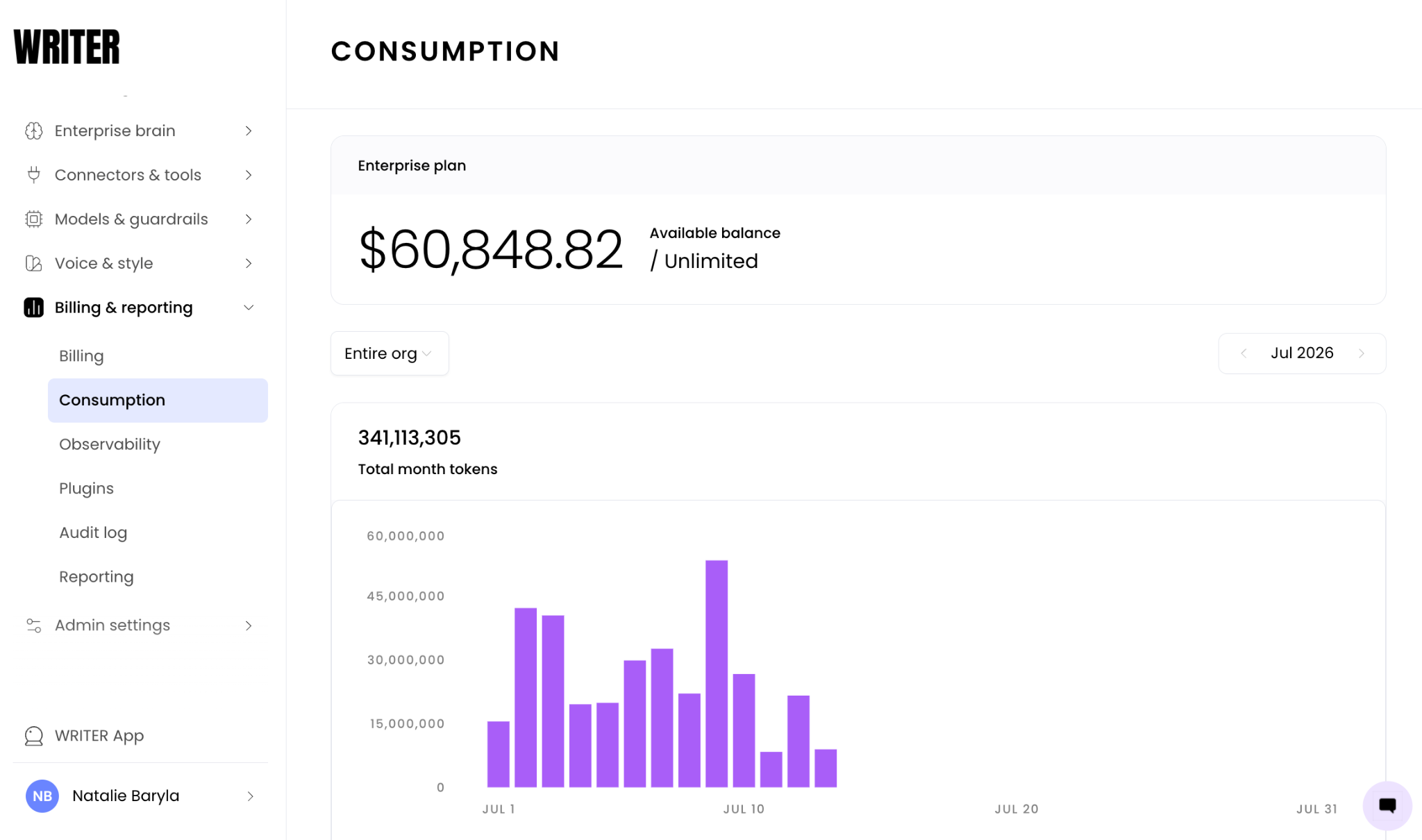
Navigate to AI Studio > Billing & reporting > Consumption
You'll see a stacked line or bar chart over time at the top, with an ordered table beneath it showing breakdowns by the selected scope.
Select a scope
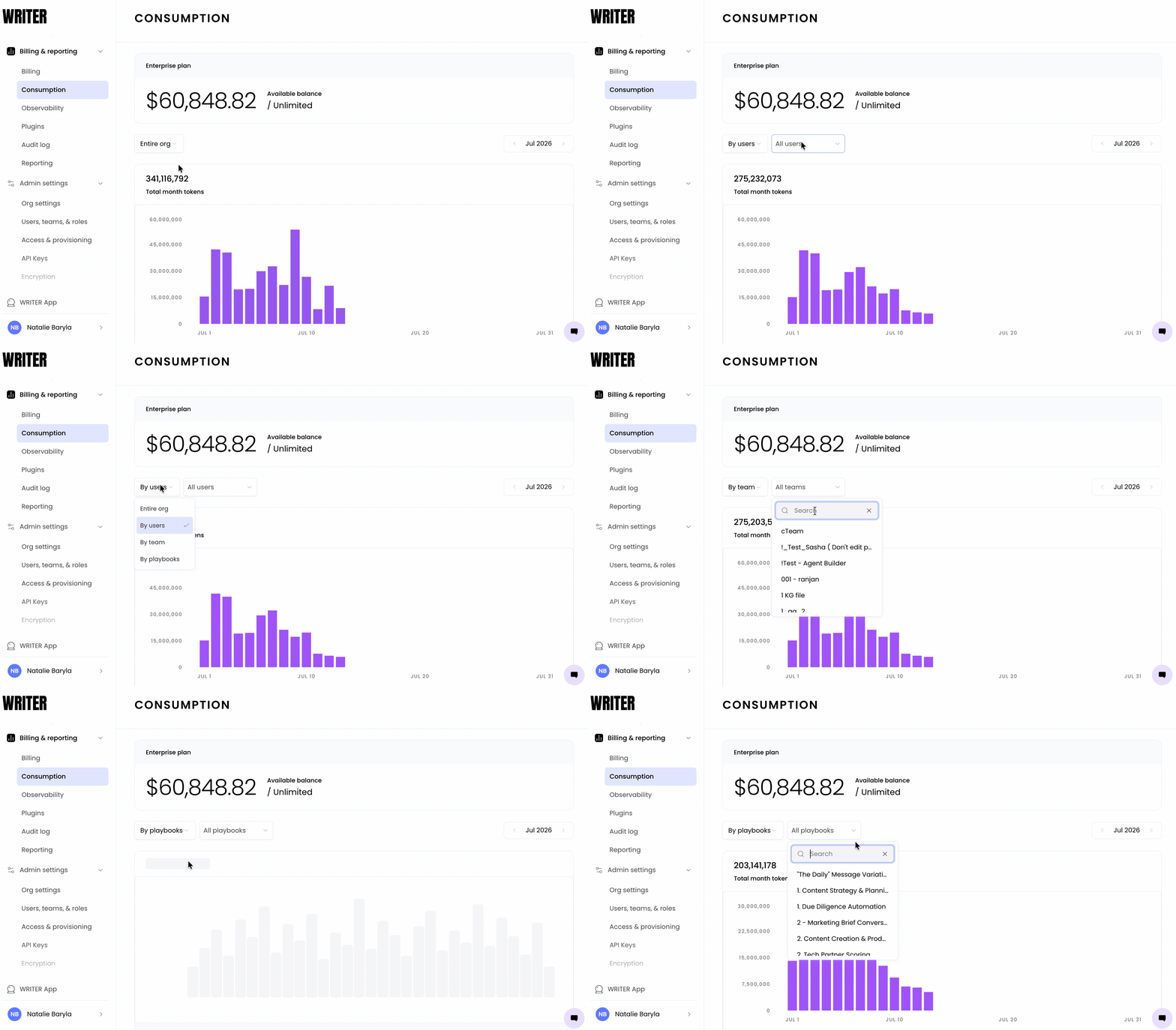
Select one of the available scopes from the filter control to break down usage and spend by that dimension:
Org-wide — summary of usage and spend across the entire organization
User — individual attribution per user
Select the User scope to view individual attribution. The graph and table update to show usage and spend broken down per user, sorted highest to lowest by default
Team — breaks down usage and spend by individual team
Playbooks — usage and cost attributed to each playbook
Use the org-wide scope for a high-level overview, and use the team scope for department-level cost attribution.
Once you select a scope, the graph adjusts to show breakdowns as stacked lines or grouped bar charts by that dimension. The chart highlights your filtered selection. You can also search for a specific user/playbook/etc after selecting a scope, instead of 'all users' or 'all playbooks'

Select the month you’d like to view consumption data for from the right of the page.
⚠ Note: Usage and spend reporting begins July 2026. You won't see data prior to that date in the Consumption page.
Understand the credit model display
The Consumption Details Pages cover pro seat and shared credit usage only. Lite seat credit usage is not included on this page at this time — you can find it under the Billing tab.
Pro seats share a single credit pool, and all usage and spend on this page reflects pro seat consumption
Lite seats have their own individual credit balances; you can track lite seat credit usage separately under the Billing tab
⚠ Note: If you're on a credit contract model with an unlimited credit pool, your account appears with an "unlimited" designation. You'll still see usage and spend trends for these accounts because the insight is valuable regardless of whether a credit limit is enforced.
FAQs
What happens if my organization is not on a credit contract model?
The Consumption page is available to customers on a credit contract model or who have enabled light seats. If your organization doesn't meet either condition, contact WRITER to enable the feature. Accounts on a credit contract with an unlimited credit pool appear with an "unlimited" designation; you'll still see usage and spend trends for these accounts.
How far back does the reporting data go?
Usage and spend reporting begins July 2026. You won't see data prior to that date in the Consumption Details Pages. Use the time horizon control to select the available billing periods.
Can I attribute usage and cost to a specific playbook?
Yes. Select the Playbooks scope to view usage and cost attributed to each playbook. This gives you a cross-user view of which playbooks drive the most usage and cost, regardless of who runs them.
What is the difference between pro seat and lite seat usage?
The Consumption page covers pro seat and shared credit usage only. Pro seats share a single credit pool, and all usage and spend on this page reflects pro seat consumption. Lite seat credit usage is not included on this page; you can find it under the Billing tab.