WRITER Agent analytics
Last updated: July 16, 2026
Who can use this feature
Org admins, IT admins, and AI Studio full access admins. Custom org-level roles can be granted access by an existing org admin.
Overview
The Analytics Overview page is designed to answer the most common questions about your AI program.
Is adoption growing? Which teams are using it most? How much are we spending? What kinds of work is the agent actually doing?
With these answers at your fingertips, you can move from reporting on activity to actively managing it. From a single page, you can monitor adoption trends, understand token consumption, and identify your highest-impact users.
How to access WRITER Agent analytics
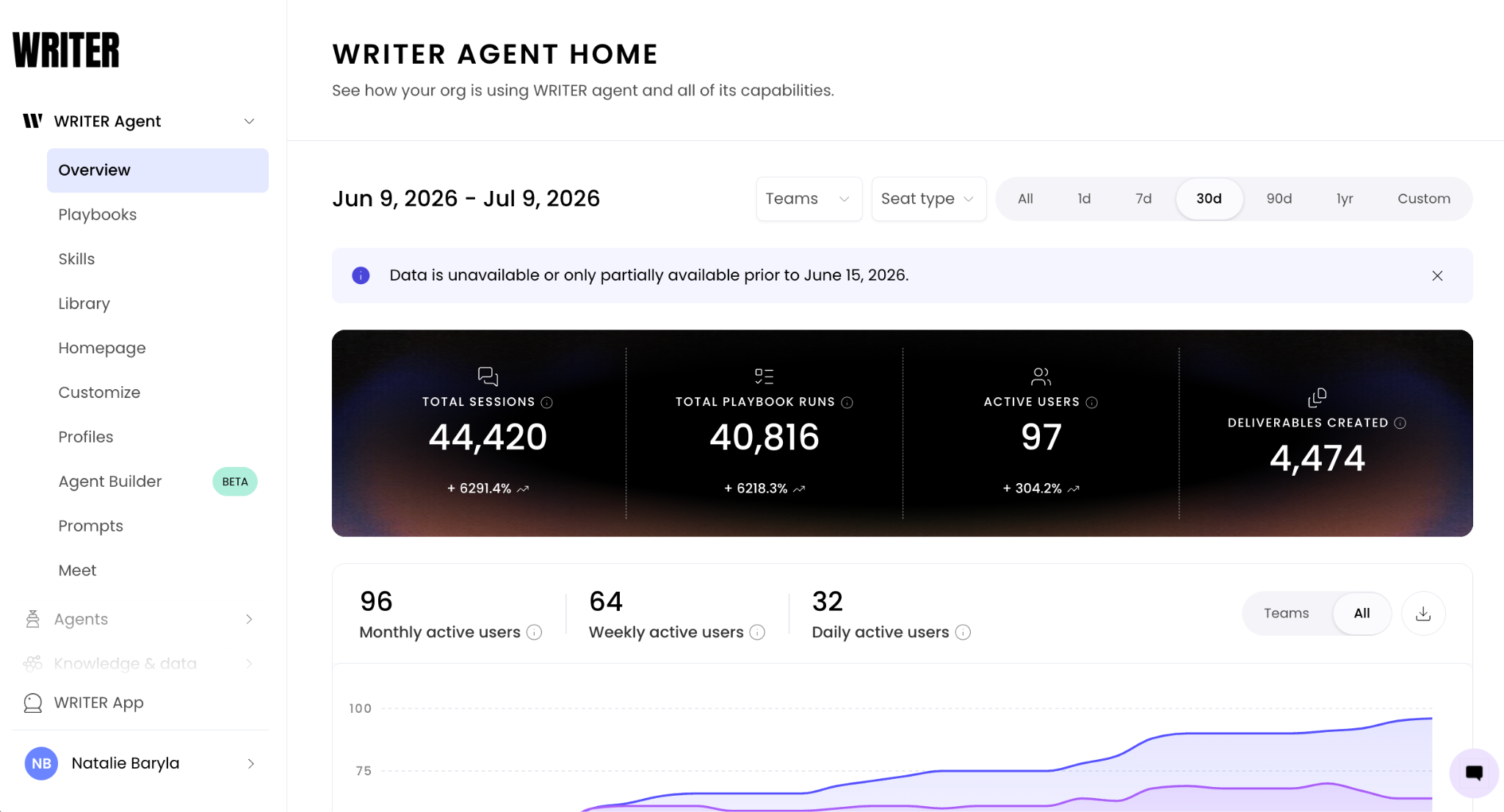
Navigate to AI Studio > WRITER Agent > Overview

Use the filters at the top to see data by team or by seat type (pro and lite). Use the date picker to the right to view trends over time.
Understanding WRITER Agent analytics
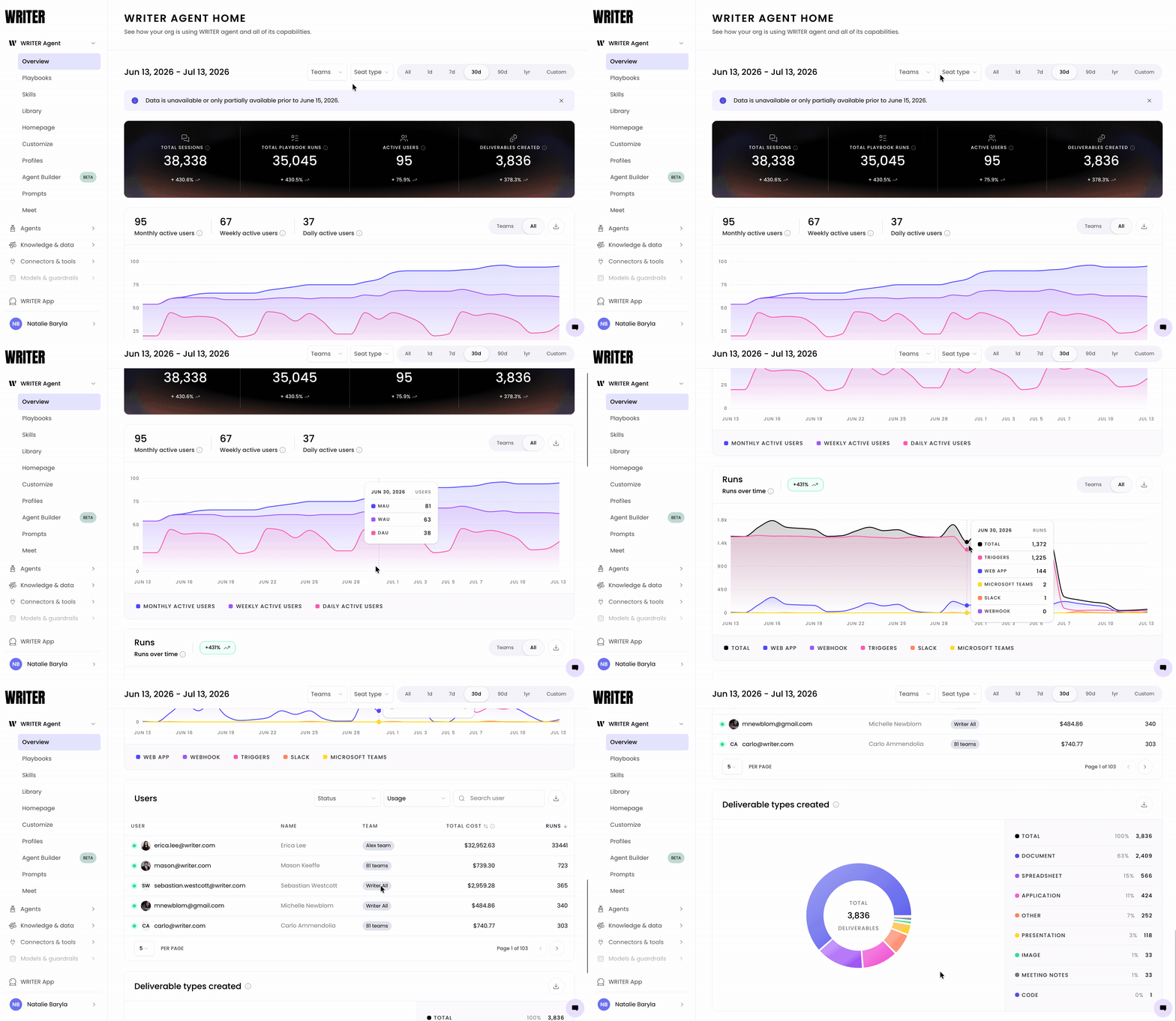
The Overview page displays a high-level snapshot of WRITER Agent activity across the entire organization. Here's what each section shows you:
Active users
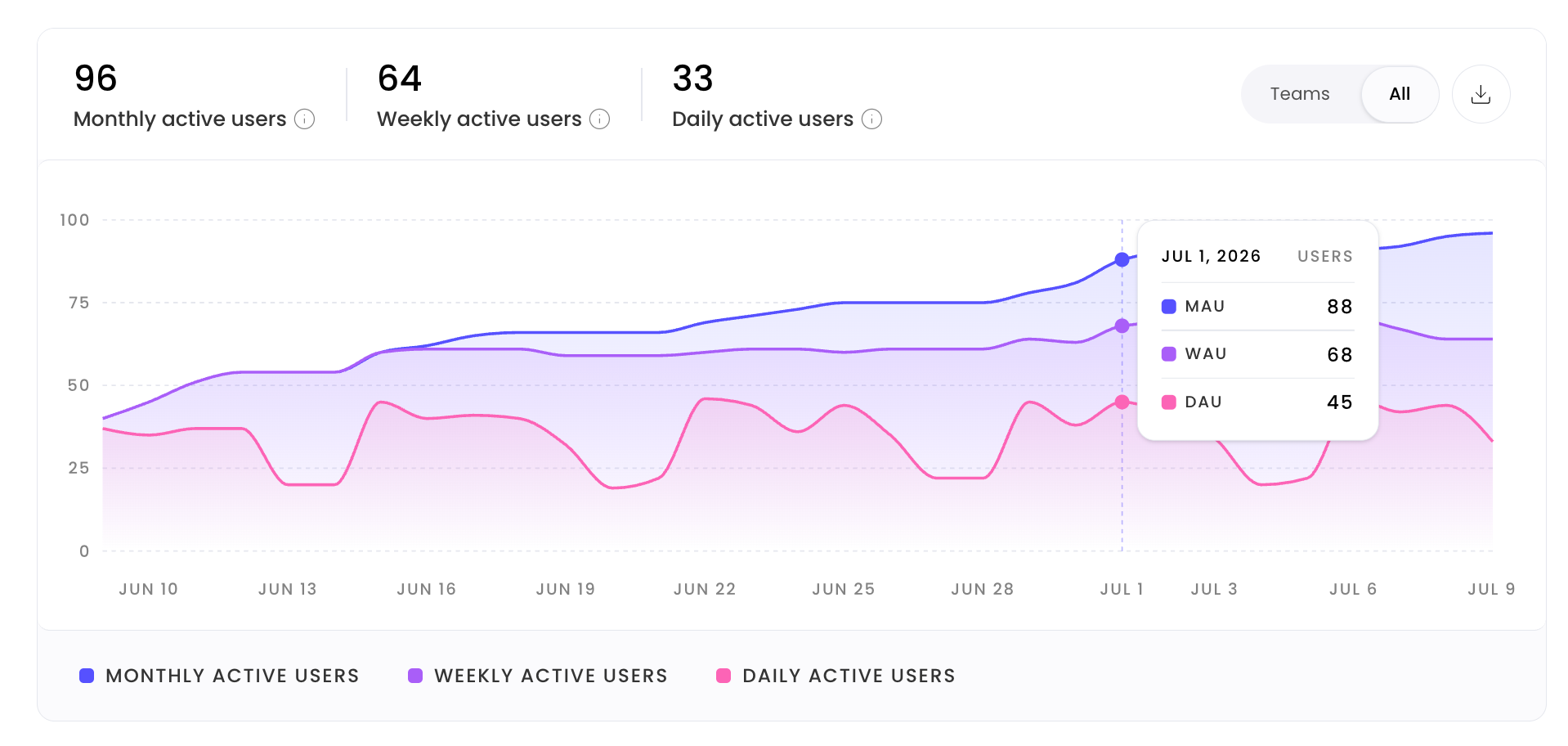
Three counts, Daily Active Users (DAU), Weekly Active Users (WAU), and Monthly Active Users (MAU), show how many distinct users have run WRITER Agent in each time window. Tracking these over time reveals whether adoption is accelerating, plateauing, or declining.
Overall runs

The total number of agent executions in the selected period. This is your primary volume metric, it tells you the aggregate scale of work the agent is performing, independent of who ran it or what type of work it produced.
Token usage
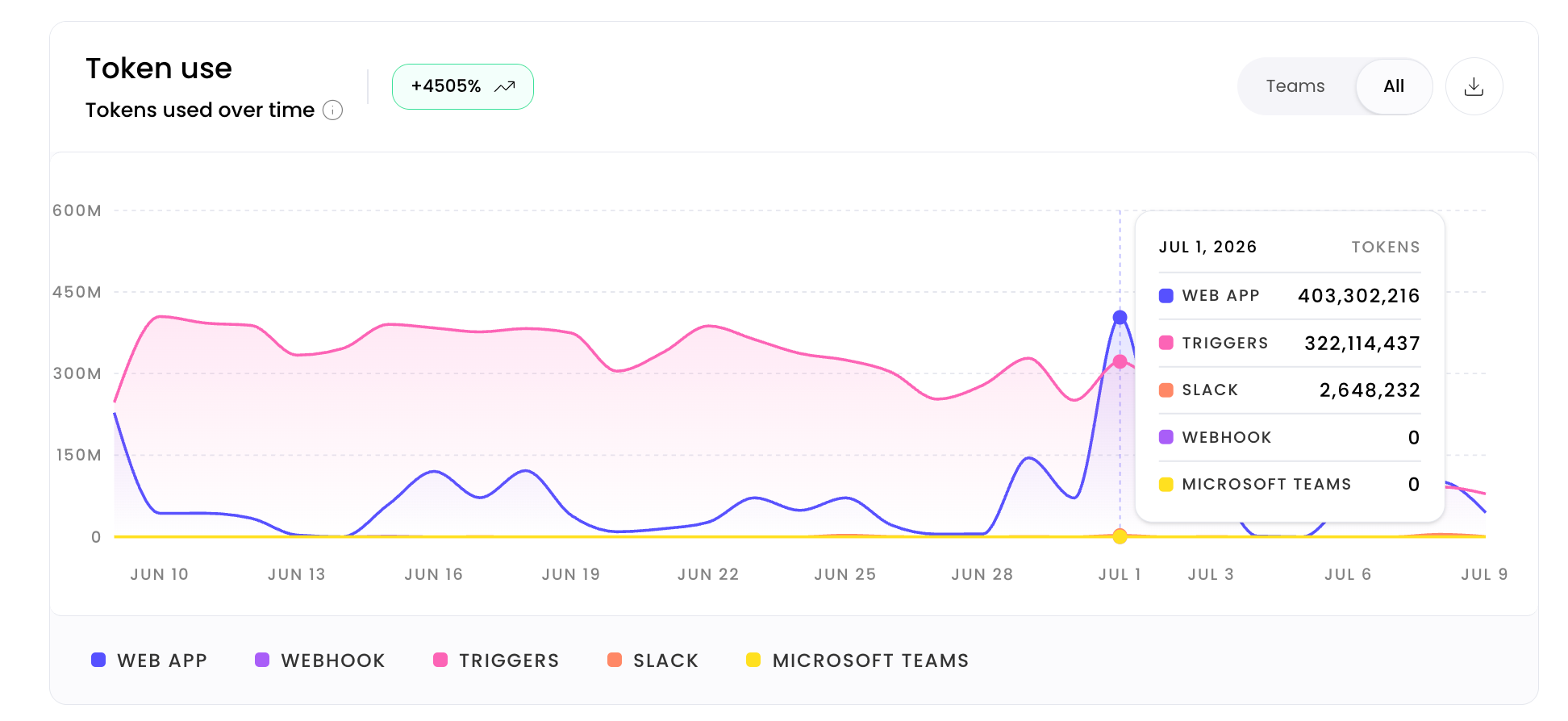
Aggregate token consumption across all WRITER Agent activity in the selected period. Token usage is the primary driver of your WRITER consumption costs. Monitoring it alongside run counts lets you understand whether your cost per run is staying consistent or whether specific activity spikes are driving unusual spend.
User leaderboard
A ranked list of the most active users by run count. The leaderboard helps you identify your power users, the people most deeply engaged with the platform who can become internal champions, provide feedback, or help onboard teammates.
Deliverable types
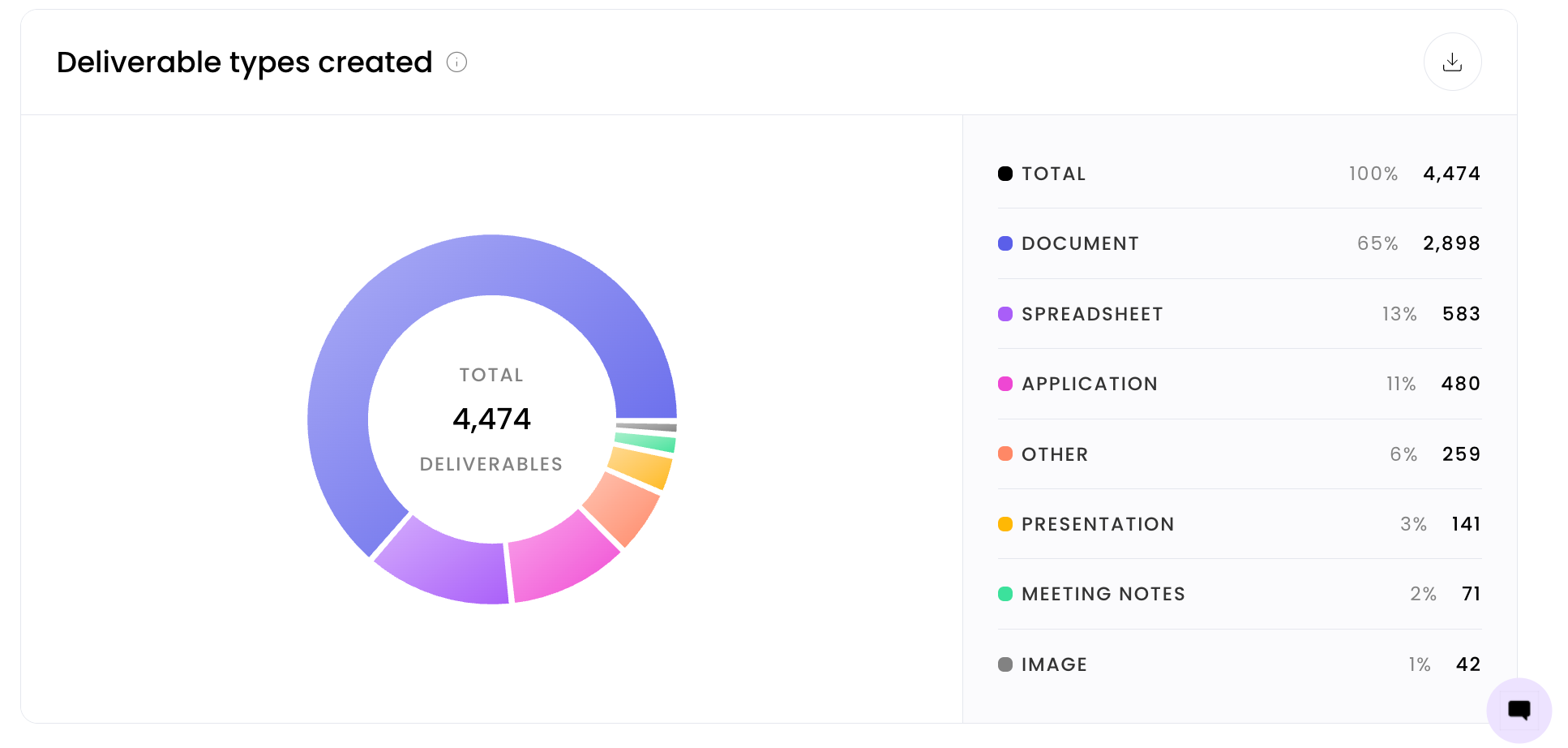
A breakdown of the types of deliverables the agent has produced in the selected period. This shows you what kind of work WRITER Agent is actually doing for your organization, whether that's documents, presentions, analyses, or other output types, and helps you understand which use cases are gaining traction.
Questions you can answer with this data
"Is adoption actually growing?"
Track daily active users (DAU), weekly active users (WAU), and monthly active users (MAU) over consecutive periods. If MAU is growing but DAU is flat, users are engaging periodically rather than habitually, a signal to investigate use case fit or workflow integration.
"Who are our most active users and teams?"
The user leaderboard shows you your top runners by volume. Use this to identify your internal champions and understand which teams have embedded WRITER Agent into their daily work.
"What kinds of work is the agent doing?"
The deliverable type breakdown shows you the distribution of work output. If one type dominates, you may have an opportunity to expand into underserved use cases. If the mix is shifting unexpectedly, it may signal that teams are using the agent for purposes you haven't fully supported with training or playbooks.
Best practices
The data on the Overview page is most valuable when it drives action. Here's how to connect what you see to decisions you can make:
Identify and activate your champions. The user leaderboard surfaces your highest-volume users. Reach out to the top 10 and invite them to an internal community of practice, a feedback session with the program team, or a peer training session. These users are your fastest path to organic adoption growth.
Investigate adoption gaps. If MAU is growing but WAU and DAU lag behind, users are trying WRITER Agent without building a daily habit. This is a training and workflow integration problem, not a technology problem. Work with team leads to identify where WRITER Agent should be a default first step in an existing workflow, not an optional add-on.
Use deliverable type data to expand your roadmap. If you see that a particular deliverable type is growing rapidly, that's a signal to build a dedicated playbook that structures and standardizes that workflow — turning ad hoc usage into a governed, repeatable process.
💡 Pro-Tip: Pull the Overview page data into your month-end stakeholder report as the first slide. Active users and overall runs give executives a clear, jargon-free view of program health without requiring them to understand the details of how the agent works.
Review the Overview page on a consistent cadence. Set a standing weekly or biweekly check-in to review active user counts, token usage, and run volume. Consistency is what turns this page from a one-time report into an early warning system.
Use the leaderboard to spread knowledge, not just measure it. The user leaderboard isn't just a report — it's a recruiting tool for building internal expertise. The most active users have discovered workflows that work. Capture that knowledge and share it.
Data availability and cost estimates
Reporting data is fully available starting from June 15, 2026. Data from before this date may be incomplete.
Cost estimates: All token usage and cost figures shown on the Analytics pages are estimates. They may differ from the final consumption accounting that appears on your invoice. Use cost data for trend analysis and relative comparisons — not as a direct substitute for invoice reconciliation. For complete information please visit the consumption page, learn more here.
⚠ Note: When comparing period-over-period data that includes dates before June 15, 2026, treat the earlier period's numbers as directional, not definitive.
FAQs
Who can access WRITER Agent Analytics?
Org admins, IT admins, and AI Studio full access admins have full access. Custom org-level roles can be granted access by an existing org admin.
What time periods can I view in the Analytics Overview?
You can select a date range using the date picker at the top of the page. Data is fully available from June 15, 2026 onward.
What does "token usage" mean, and why does it matter?
Token usage measures the volume of language model processing consumed by WRITER Agent activity. Higher token usage means more complex or more frequent agent work, monitoring it helps you anticipate costs and identify workflows that may benefit from optimization.
Is the data on the Overview page real-time?
The Analytics pages reflect recent activity, but data may not update instantaneously. Use the page to understand trends and patterns rather than second-by-second activity.
Are the cost figures on the Analytics pages exact?
No. Cost data is an estimate and may differ from final consumption accounting on your invoice. Use cost figures for trend analysis and relative comparison. A tooltip on each cost data point provides additional context.
How far back does my data go?
Reporting data is fully available starting from June 15, 2026. Data from before this date may be incomplete.
Can I export the data from the Analytics Overview?
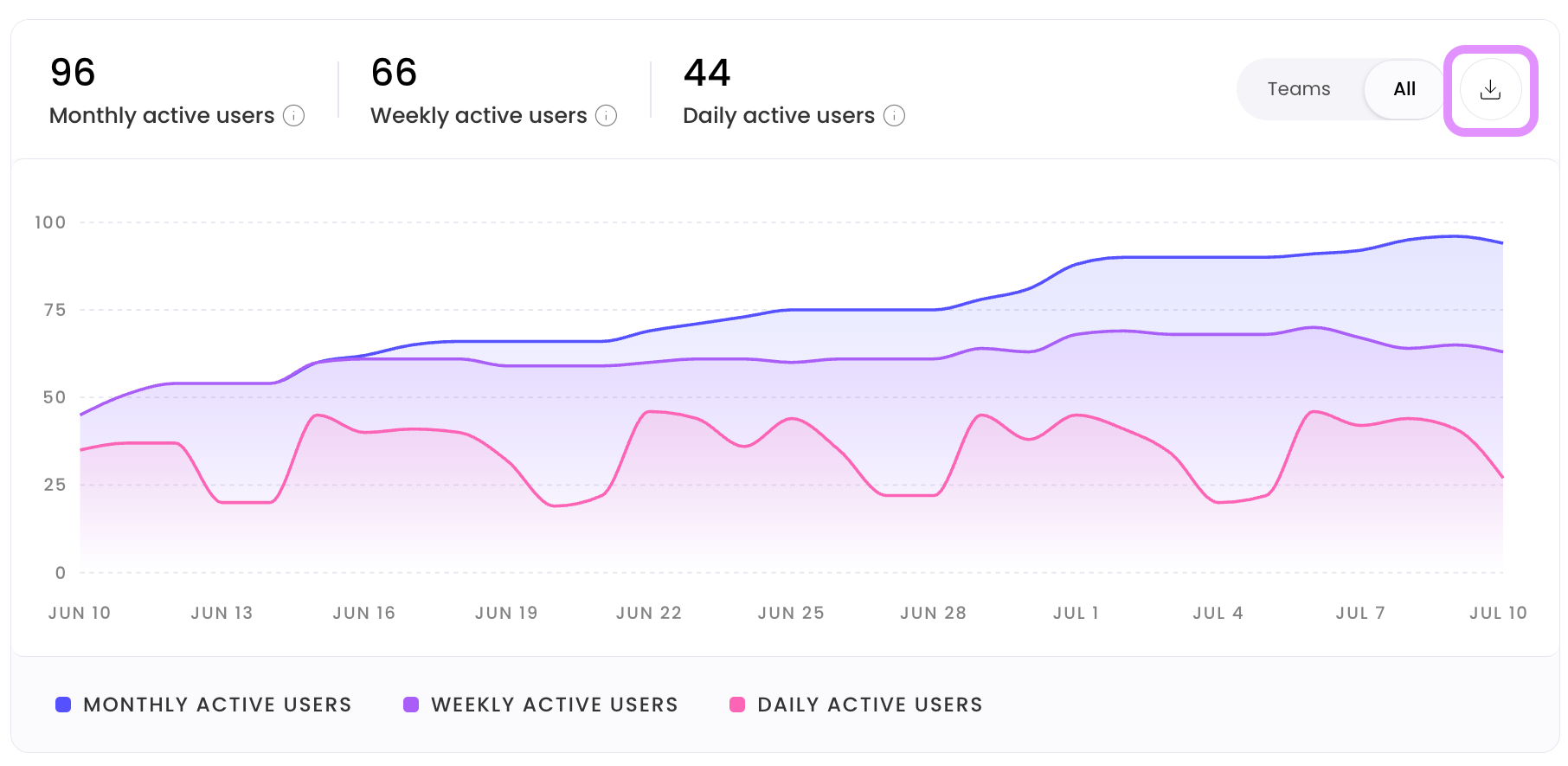
Yes, select the download icon in the top right of the report you’d like to download.
Can custom roles access the Analytics pages?
Yes. Org admins can grant the WRITER Agent reporting permission to any custom org-level role.
What is the user leaderboard based on?
The user leaderboard ranks users by their WRITER Agent activity, specifically, the number of agent runs they have initiated in the selected time period.
Does the Overview page show data for all teams in the organization?
Yes. The Overview page reflects org-wide activity across all teams and users who have run WRITER Agent.