Understanding skills in WRITER Agent
Last updated: October 6, 2026
Overview
Skills are reusable capability packages that extend what WRITER Agent can do. Think of them as specialized toolkits that give the agent expert knowledge and workflows for specific tasks. WRITER Agent comes with over 200 skills, along with the ability to create custom skills for your unique workflows.
Packaged expertise
Self-contained packages with documentation, scripts, and reference materials
Each skill includes a SKILL.md file that guides the agent through specialized workflows
Pre-built scripts and utilities for complex operations
Consistent results
Same proven workflow every time
Handles edge cases systematically
Tested scripts and patterns
Quality guarantees built in
Skills = Tools in a toolbox
Hammer, screwdriver, saw
You use them as needed
Expertise in using them well
Playbooks = Assembly instructions
Step 1: Use hammer to attach board A
Step 2: Use screwdriver for screws B
Step 3: Use saw to trim edge C
You need good tools (skills) to execute good instructions (playbooks) successfully
Using skills
WRITER provides 200+ official skills designed for common tasks across industries. These production-ready skills cover healthcare, financial services, CPG & retail, and general business operations. You can use skills within playbooks or during ad-hoc WRITER Agent sessions.
Using skills in WRITER Agent
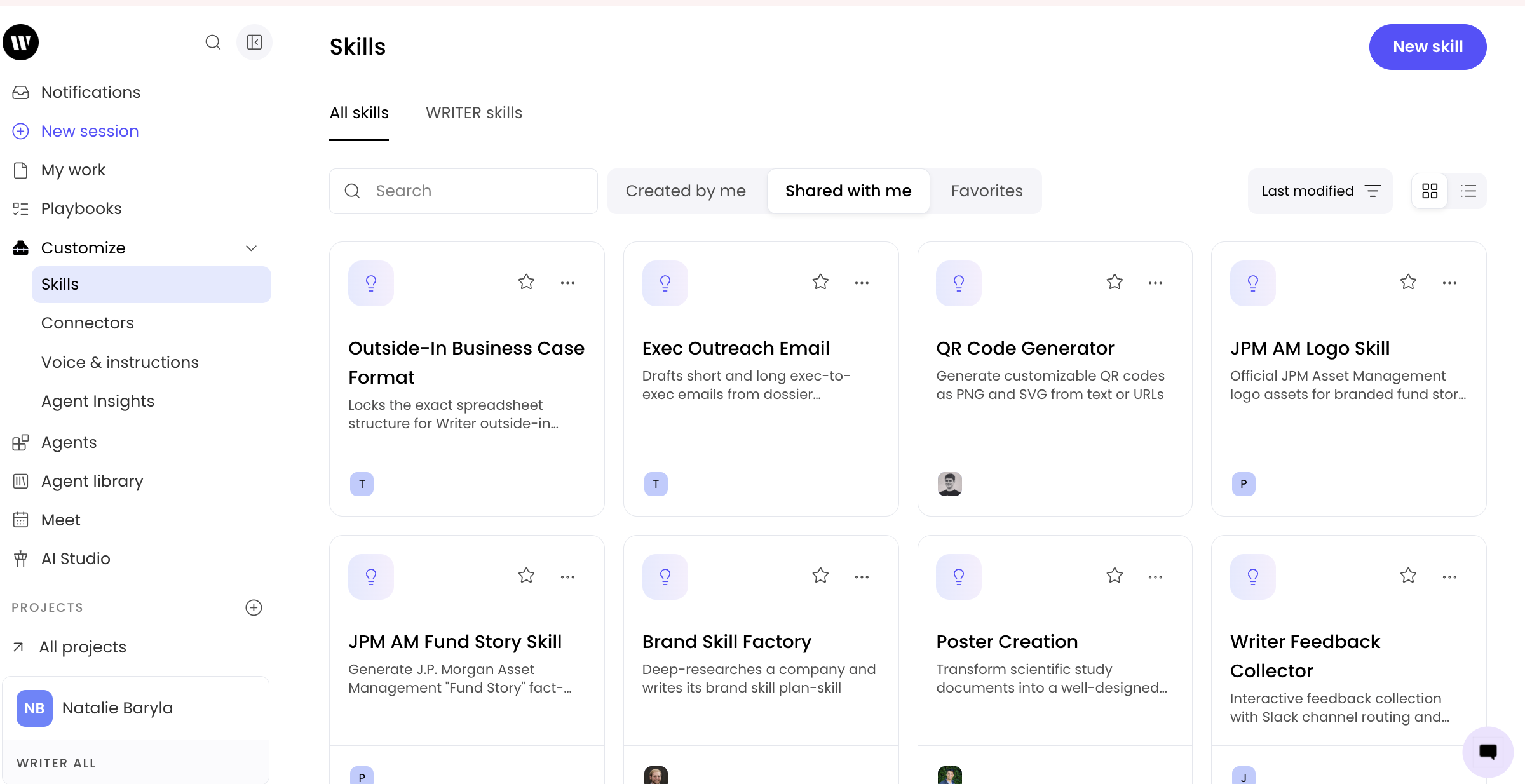
From Customize > Skills you'll find all skills available for you to use. The skills that have been created by members of your organization and made available to you can be found in the Shared with me tab. These skills are automatically available for you to use in WRITER Agent via the + menu or by using the / menu. Additionally, WRITER Agent will automatically invoke skills based on your prompt.
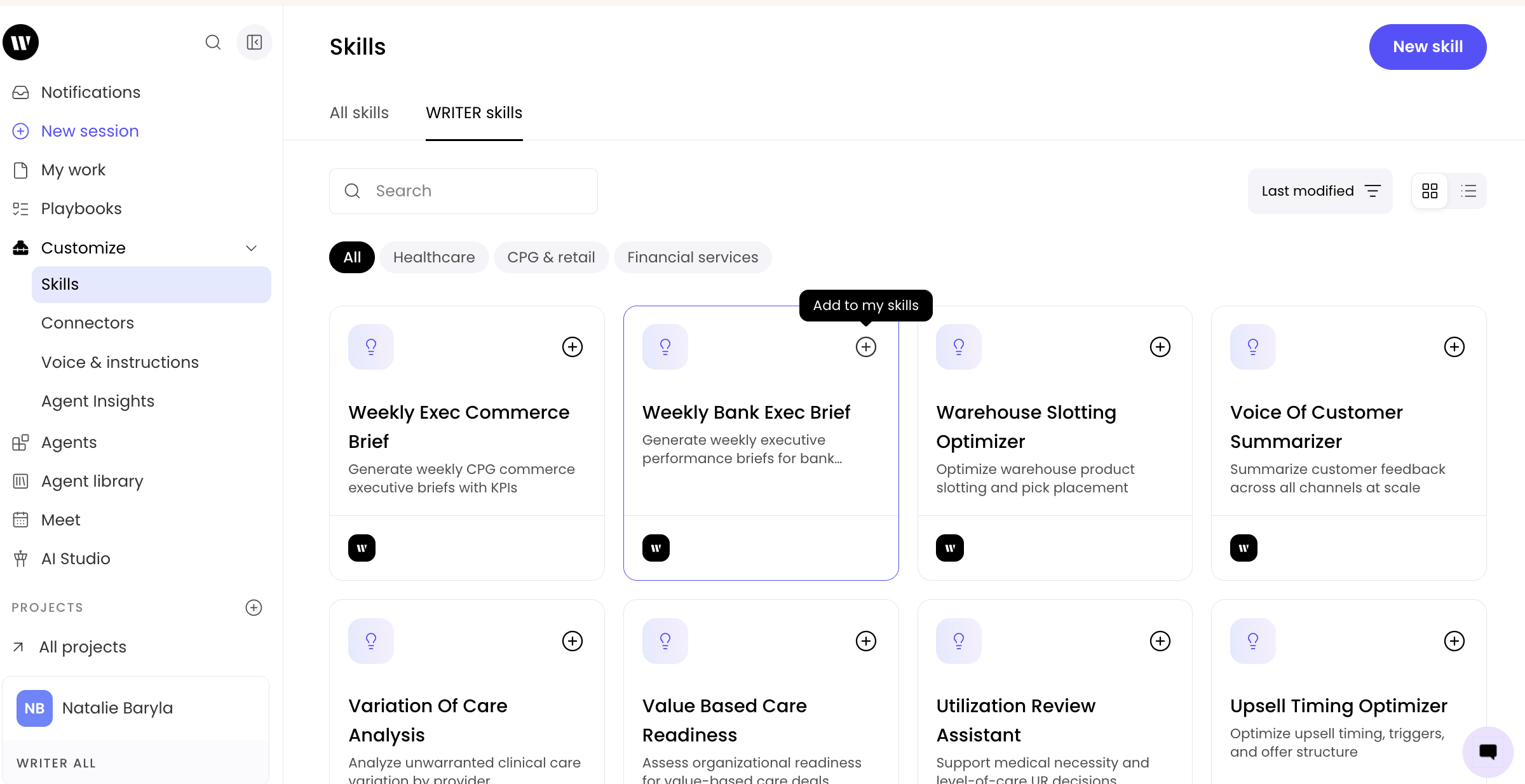
In addition to custom skills created by members of your organization, you can also find WRITER created skills by selecting the WRITER skills tab. Select the + icon next to any of these skills to add them to your skill libray. Once added these skills can be used in any WRITER Agent session through the + or / menus.
Basic skill invocation

To explicitly use a skill, type / and select the skill from the dropdown. WRITER Agent also automatically invokes installed skills when it determines they would benefit your task—no manual invocation needed. You can also select the skill creator from the "/" menu to create a custom skill. Learn more about creating custom skills here.
What happens when you invoke a skill:
Skills can be invoked in two ways:
Explicit invocation:
You mention a skill using /skill-name in your message
WRITER Agent acquires the skill's documentation from /skills//SKILL.md
The agent follows the skill's specialized instructions
Automatic invocation:
You describe a task in natural language
WRITER Agent analyzes your request and the skills you've installed
If a skill matches your needs, the agent automatically invokes it
The skill's capabilities are applied without requiring manual selection
In both cases, your task is executed following the skill's best practices and patterns, and the agent delivers results that match the skill's output standards.
Using skills with uploaded files
Skills work seamlessly with files you upload to the chat:
Upload your file to the conversation
Type / and select the relevant skill with your instructions
WRITER Agent processes the file using the skill's specialized capabilities
💡 Pro-Tip: Browse the complete skill library in Customize > Skills > WRITER skills to discover all 200+ official skills available to your organization.
Adding skills to playbooks
Skills and playbooks work together powerfully. Playbooks orchestrate complex workflows while skills provide expert-level execution for specific steps.
How they complement each other:
Playbooks: Define the overall blueprint—what steps happen and in what order
Skills: Provide the fine-grained details—exactly how each step is executed, including which scripts to run
The combination is powerful: The playbook becomes your strategic orchestration, while skills handle the tactical execution with precision.
Adding skills to playbook steps
Method 1: In the playbook editor
Open your playbook in the editor
Look for the Skills section in the right-hand settings panel
Search for and select the skills you want to include in this playbook
The agent will have access to these skills when running the playbook
Method 2: In playbook step text
Use the / menu directly in your playbook steps.
Learn more about playbooks here.
⚠ Note: Skills aren't loaded until they're invoked in the playbook execution, so you can reference many skills without overwhelming the agent's context.
How to create custom skills
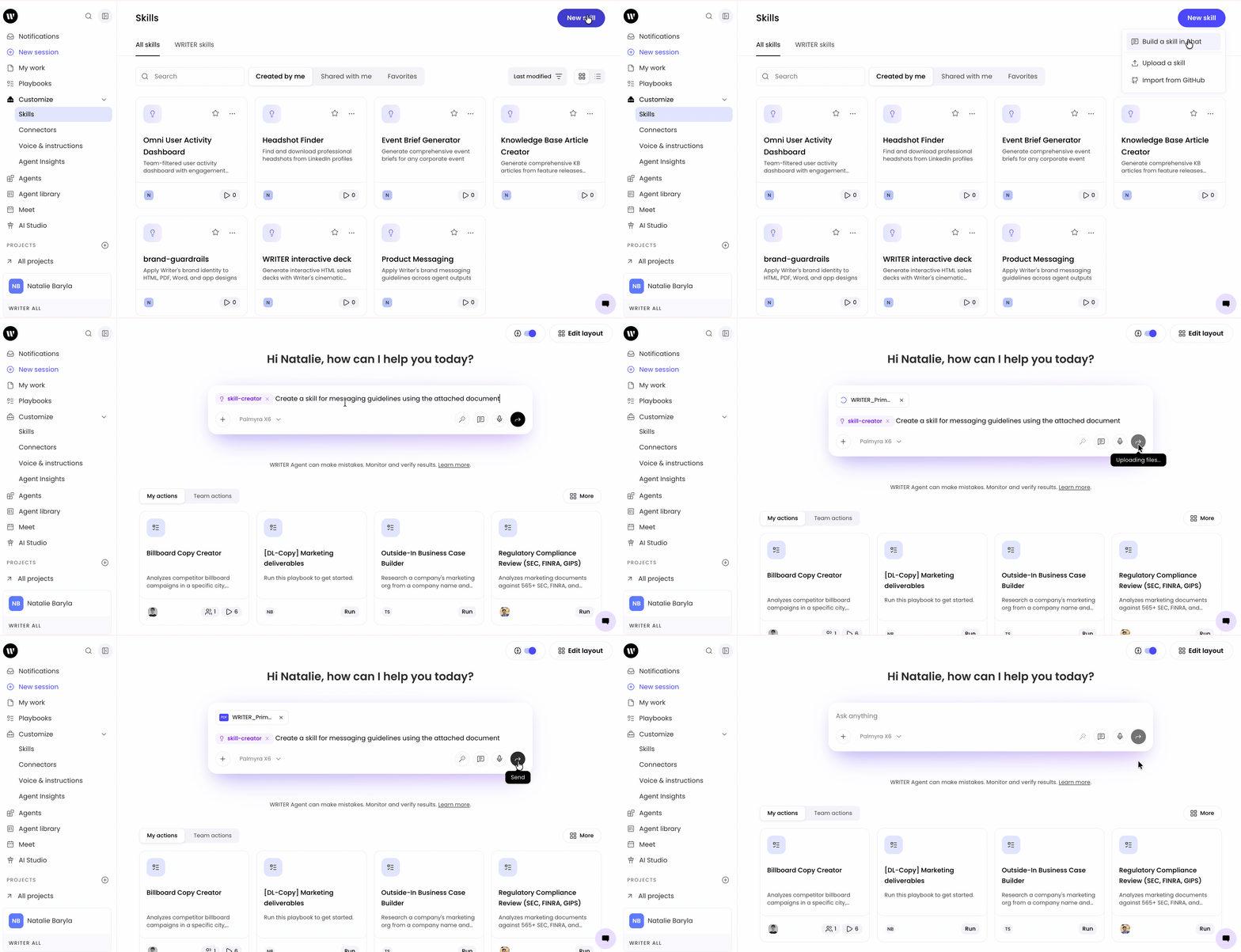
Navigate to the Skills tab within the Customize menu and select New skill > Build a skill in chat. Describe what the skill should accomplish, and submit your prompt.
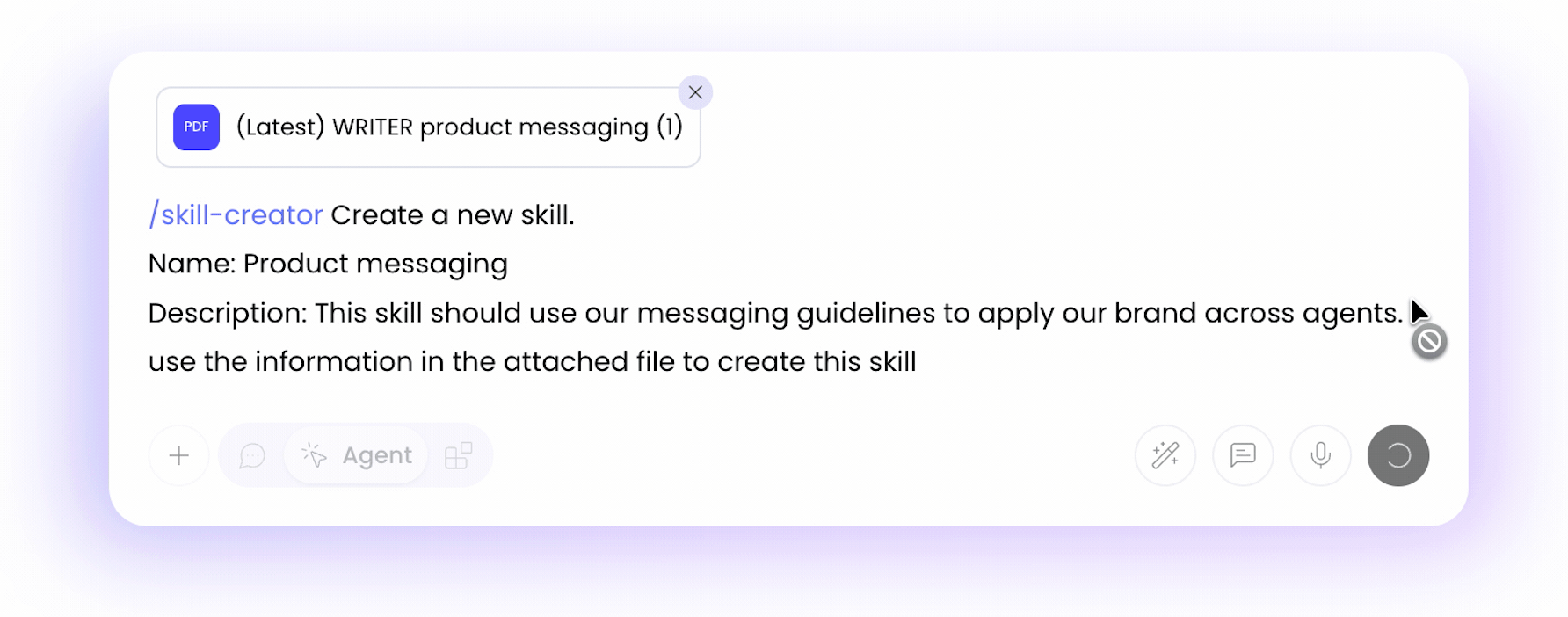
Additionally, you can invoke the skill creator in WRITER Agent by inserting /skill-creator into your prompt. Once you see the skill generation prompt appear you can make adjustments to your skill description and then enter the input to begin the process. This will launch a new WRITER Agent session where it will build your skill.
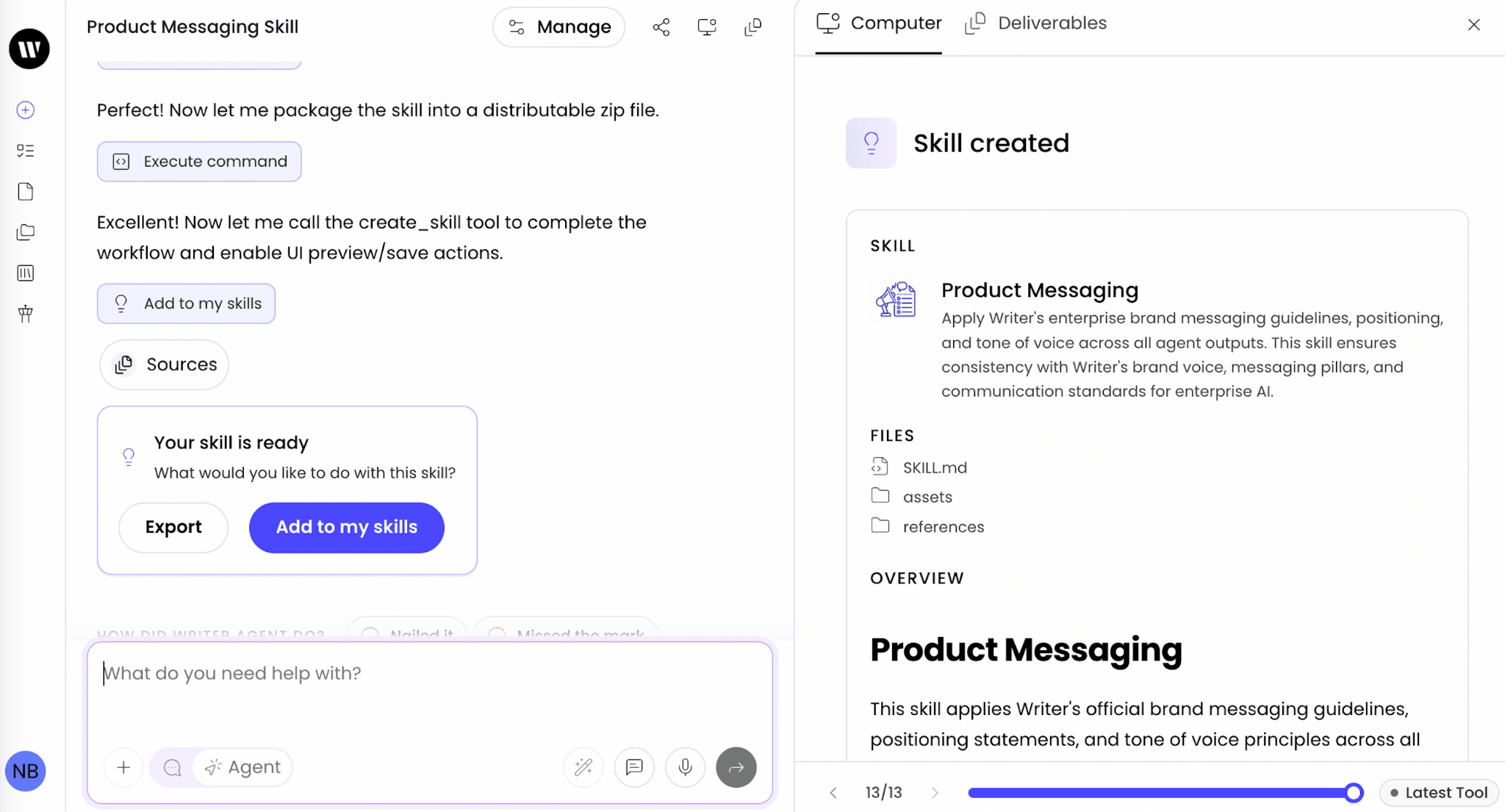

Once ready, you’ll be able to add it to your skills or export your skill to share it outside of your WRITER org. Once added to your skills, you’ll be able to use it via the steps described above.
Note: The maximum size for a custom skill's SKILL.md file and its associated reference materials is 50MB (for skill files that are zipped) and 10MB (for zip files).
Managing skills
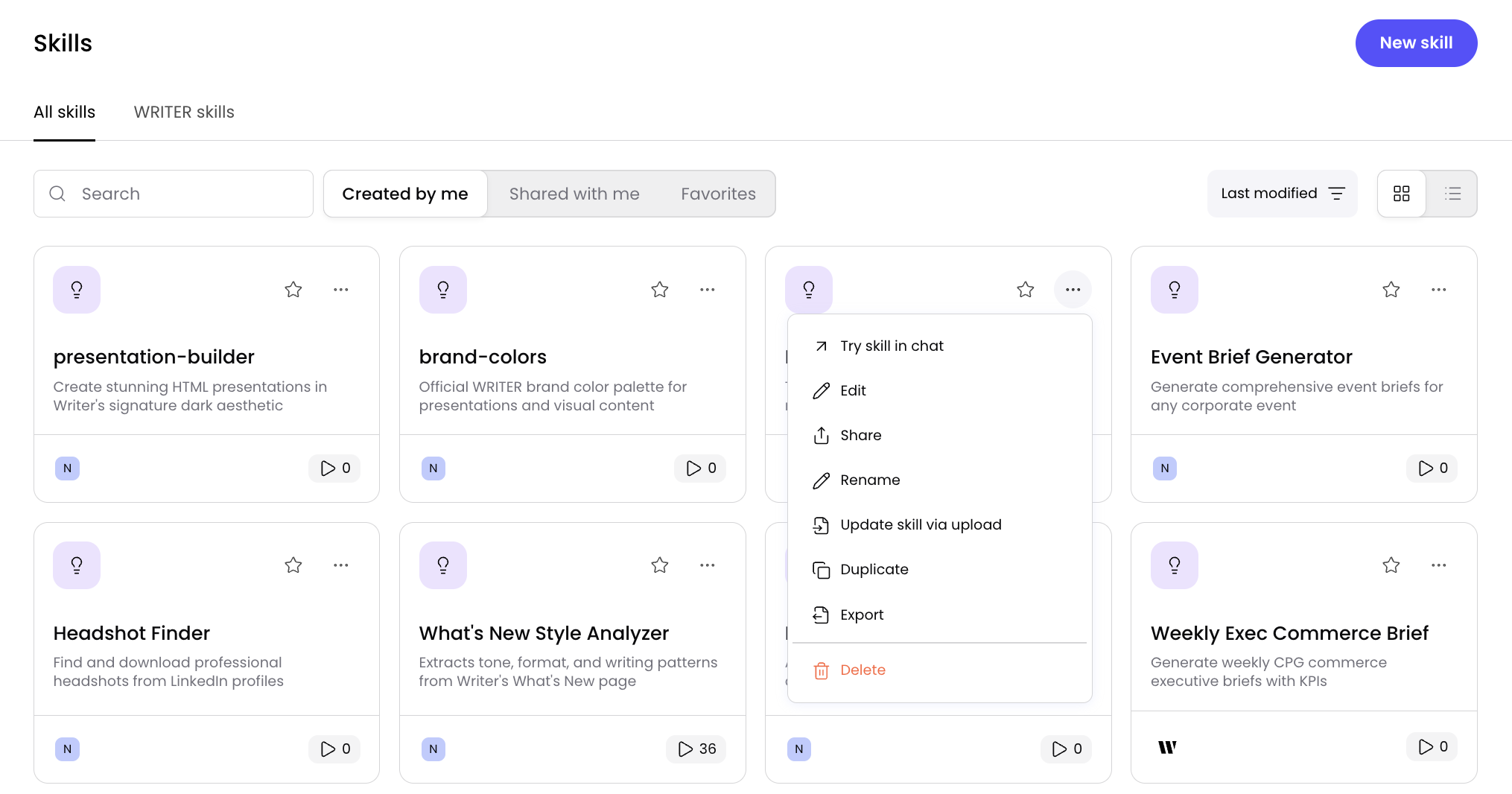
The three dot icon on your skills opens a menu where you can complete the following actions:
Try skill in chat: use the skill in a new session with WRITER Agent
Edit the skill: this will automatically update the skill for anyone you've shared it with
Share: enable others in your organization to use the skill your created when they work with WRITER Agent
Rename: edit the name of the skill and update it across where that skill has been shared
Update skill via upload: overwrite the skill details via .md uploaf
Duplicate: create a copy of the skill you can edit without impacting the original skill
Export: export a file containing the skill to use outside of WRITER
Delete: this action permanently removes the skill for you as well as anyone you've shared it with.
To recover a deleted skill, locate a session that used the skill and ask WRITER Agent to regenerate that skill for you.
⚠ Important: If you duplicate a skill, no updates made to the original skill be reflected in your duplicated skill.
Accessing your skills
My skills:
Skills you've created or duplicated
Found in Skills > My Skills
Shared with me:
Custom skills shared by your organization that are available for you to use
Found in Skills > Shared with me
WRITER skills:
Official WRITER skills (200+ available)
Browse skills and use the + icon to add to your skills and use with WRITER Agent
Found in Skills > WRITER skills
How to access:
Use the / menu in any chat to see available skills
Select Manage skills to view by category or search by name
Instant access to invoke any skill
Uploading skills
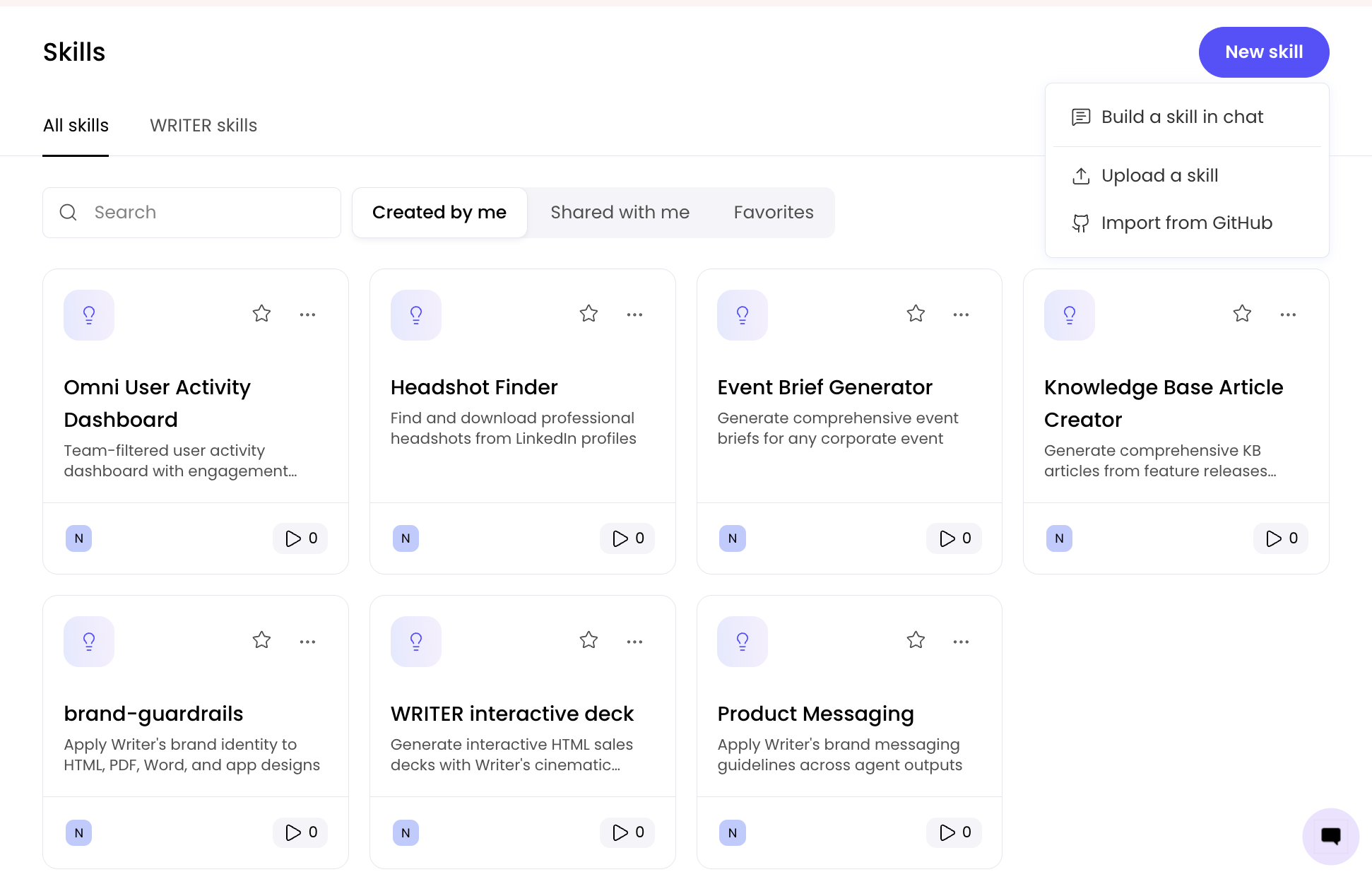
To upload a skills file or import skills from Github, navigate to Customize> Skills > My skills and select New skill.
Sharing skills with your team
You can share custom skills with individuals or entire teams:
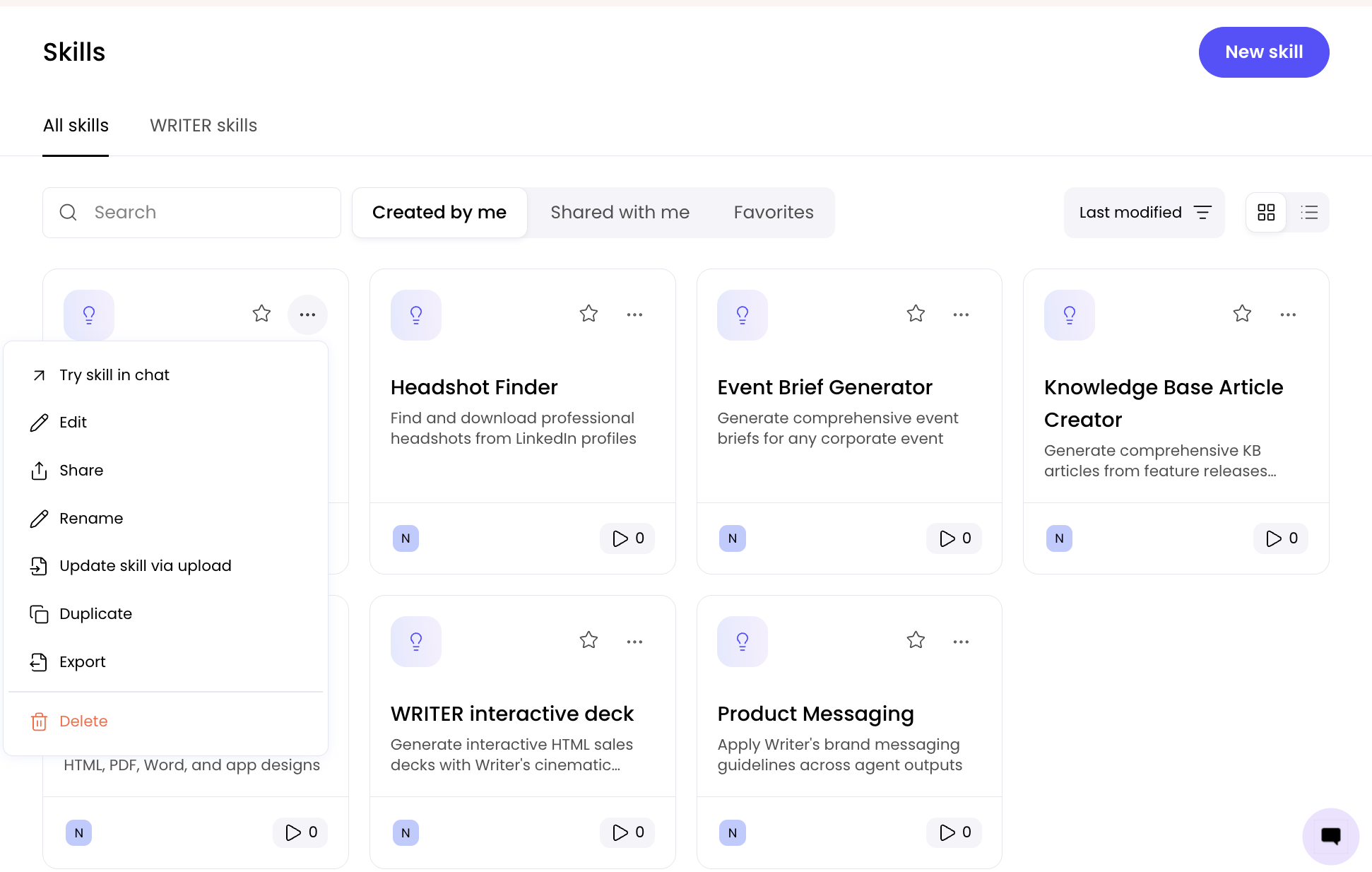
Go to Customize > Skills
Select the three dot menu on the skill you want to share, and then select Share

Select who to share the skill with (individuals or entire teams) and select share. Those you’ve selected to share with will now find the skill within Skills > Shared with me.
Editing skills
You can edit custom skills you've created to refine their instructions, update documentation, or add new reference materials.
To edit a skill:
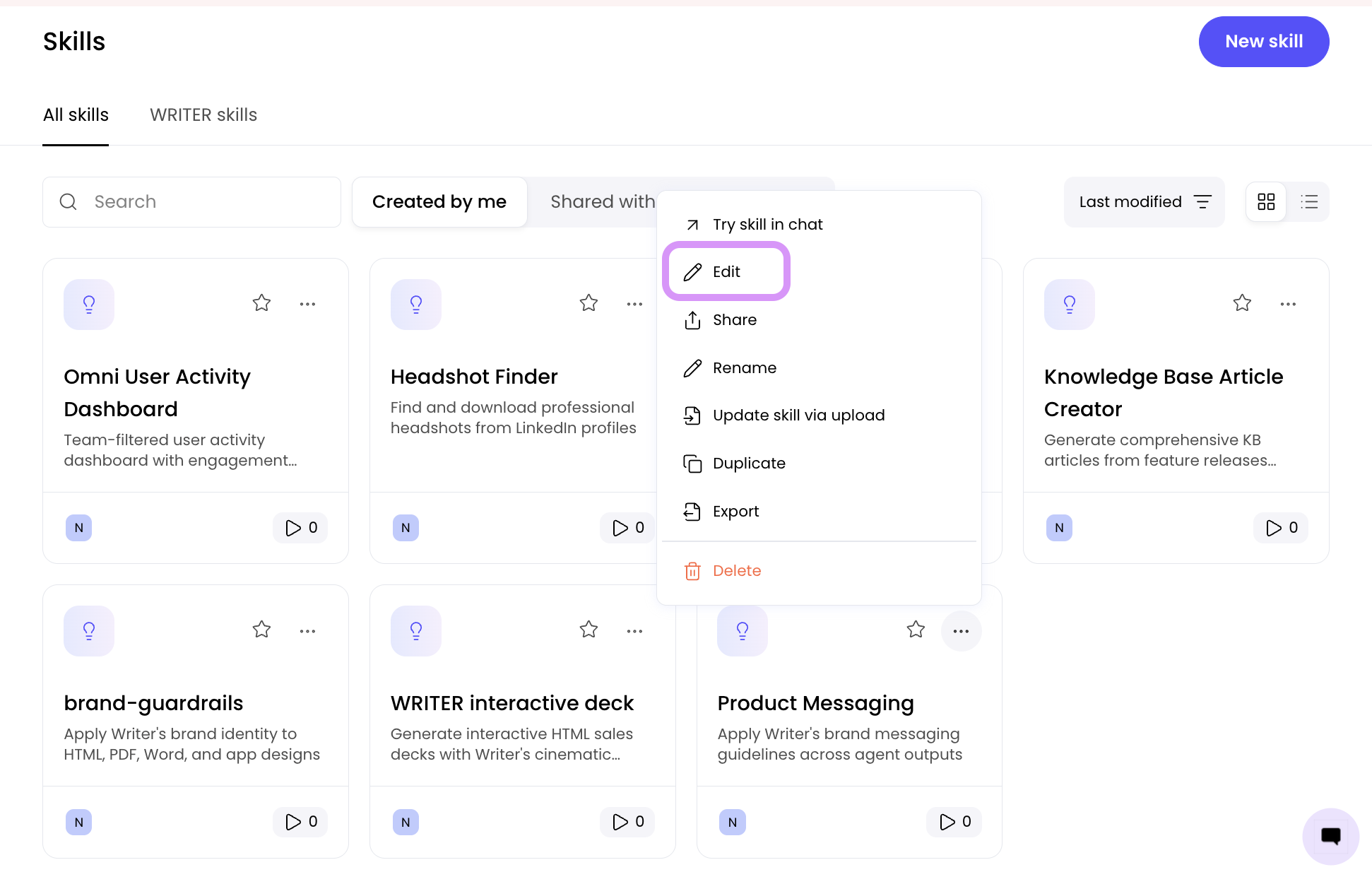
Go to Customize > Skills to locate the skill you want to edit and select the three-dot menu on the skill and choose Edit.
Two ways to edit your skill:
Method 1: Edit in the interface
Once on the edit screen, you can make changes directly:
Adjust the skill description and instructions
Modify the SKILL.md content
Upload or replace files within the skill package
Update reference materials
💡 Pro-Tip: When editing skills, maintain the same structure and formatting as the original to help WRITER Agent follow the instructions consistently. Test your edited skill in a chat session before sharing it with your team.
Method 2: Upload a complete skill file
If you've made extensive changes locally:
Prepare your updated skill as a complete .md file or .zip package
On the edit screen, upload the new file to replace the existing skill content
The skill will be updated with your new documentation and files
Note: The maximum size for a custom skill's SKILL.md file and its associated reference materials is 50MB (for skill files that are zipped) and 10MB (for zip files).
How skills work
Skills integrate seamlessly into WRITER Agent's workflow:
Auto-triggering: The agent automatically detects when an installed skill would benefit your task. This works for file types (PDFs, DOCX, PPTX), specialized workflows, and any other capabilities your installed skills provide. You don't need to manually invoke skills—the agent applies them when relevant.
Guided execution: The skill provides step-by-step instructions the agent follows precisely
Pre-built scripts: Instead of writing code from scratch, the agent uses tested scripts from the skill's scripts/ folder
Reference materials: Skills include specialized guides for complex scenarios
Example workflow
Example: Automatic skill invocation
You: "Extract all financial tables from this earnings report PDF"
↓
Agent: Detects PDF + installed PDF skill → Automatically acquires skill → Reads SKILL.md
↓
Follows instructions: Check for tables → Use extraction script → Format output
↓
Delivers: Structured data with proper citations
Example: Explicit skill invocation
You: "/pdf Extract tables from this earnings report"
↓
Agent: Explicitly invoked PDF skill → Reads SKILL.md
↓
Follows instructions: Check for tables → Use extraction script → Format output
↓
Delivers: Structured data with proper citations
Examples of skills
WRITER Agent comes with a few system skills that you won’t see when using WRITER Agent This includes PDF, DOCX, and PPT skills that extract data and generate content. You can find over 200 other skills within Customize > Skills > WRITER skills. Below are a few examples of other skills you may consider using or creating through WRITER Agent.
Color Extraction
Analyze images to extract color palettes
Generate brand guidelines
Output in multiple formats (hex, RGB, color names)
Data Pipeline
Transform CSV files
Validate data
Enrich datasets
Output formatted reports
Code Review
Scan repositories for patterns
Generate security reports
Apply specific checks
Compliance Checker
Review documents against regulatory requirements
Include standard citations
Generate compliance reports
Skills vs playbooks
While skills and playbooks are both powerful features, they serve different purposes:
Aspect | Skill | Playbook |
Purpose | Technical capability (HOW) | Business process (WHAT) |
Trigger | Automatic when needed | Manual, scheduled-based, or event-based |
Inputs | None (internal) | User variables, files, connectors |
Scope | Single capability | End-to-end workflow |
Scheduling | No | Yes |
Real-world example
Scenario: Generate weekly sales reports from Gmail and Google Sheets
Playbook approach:
Playbook: "Weekly Sales Report Generator"
1. Data Collection
- Fetch emails from [w-connector](GMAIL)
- Read sales data from [w-connector](GOOGLE_SHEETS)
2. Analysis
- Calculate weekly metrics
- Compare to previous period
3. Report Generation
- Create formatted report
- Add charts and visualizations
- Export as PDF
Completion
- Send report via email
This is a playbook because it:
Orchestrates multiple services
Requires user inputs
Defines a complete business process
Can be scheduled
Behind the scenes, the playbook uses skills:
PDF skill for export
Data processing skills for analysis
Formatting skills for charts
Working together
The most powerful workflows combine both:
Playbook: "Generate Brand Guidelines Document"
Step 1: Extract colors (uses custom color-extraction skill)
Step 2: Create document (uses built in DOCX skill)
Step 3: Export PDF (uses built in PDF skill)
The playbook orchestrates the workflow, while skills provide the technical capabilities.
When to create a skill
Create a skill when:
✅ You do the same workflow repeatedly
✅ Quality and consistency matter
✅ Process has specific requirements
✅ Multiple team members need it
✅ Domain expertise is required
✅ Edge cases must be handled properly
Just ask the agent when:
❌ One-off task
❌ Exploratory work
❌ Requirements unclear
❌ Maximum flexibility needed
The consistency advantage
Without a skill (ad-hoc approach):
Agent figures out approach each time
Results vary between requests
May miss edge cases
Reinvents solutions
With a skill (structured approach):
Same proven workflow every time
Tested scripts and patterns
Handles edge cases systematically
Consistent quality
Example: Color extraction
Scenario: Your team needs to extract color palettes from brand images weekly
Without a skill:
Week 1: "Extract colors from logo.png"
→ Agent tries PIL, outputs RGB values
Week 2: "Extract colors from banner.jpg"
→ Agent tries different approach, outputs hex codes
Week 3: "Extract colors from mockup.png"
→ Agent uses yet another method, different format
Result: Inconsistent outputs, no standardization
With a skill:
Create skill: "extract-colors"
- Standard method (specific library)
- Consistent output format (hex + RGB + color names)
- Handles transparency, dominant colors
- Generates visual swatches
Every use: "Extract colors from "
→ Always same quality, same format, reliable results
FAQs
Can I share skills with my team?
Yes, skills can be shared across your organization to ensure consistent workflows and quality.
Do skills work with playbooks?
Absolutely! Playbooks often use multiple skills behind the scenes to execute their workflows.
What's the difference between a skill and a playbook?
Skills are technical capabilities that the agent uses automatically. Playbooks are specific steps that the agent follows to complete your workflow.
Does WRITER Agent come with any default skills?
Yes, you can find over 200 skills in Customize > Skills > WRITER skills
How many skills can I have?
There's no limit to the number of skills you can create or use.