Controlling playbook and skill creation & sharing
Last updated: October 16, 2026
Org admins can restrict playbook creation and publishing/sharing as well as skill creation and sharing to designated users by assigning a limited team member role. Users with the limited role keep their regular team member access but can no longer create, publish, and share playbooks nor can they create and share skills. This article explains how the role works, how to assign it to individual users, and how to assign it automatically through domain access or SCIM IDP group mappings.
About the limited team member role
The limited team member role is an opt-in role that gives you control over who can build and distribute reusable workflows across your organization. It preserves standard team member access while removing the ability to create and share (publish) playbooks.
Users assigned the limited role can still:
View playbooks available to them
Run existing playbooks they have access to
Create and share skills
Use skills shared with them
The role is designed for governance scenarios where playbooks and skills need to be owned by designated builders, while the broader team can continue using shared workflows.
Important: This feature is opt-in. The existing Team member role remains the default unless an org admin explicitly changes it. Assigning the limited role to a user does not remove their access to playbooks they could already run, however they will no longer be able to edit any playbooks they previously created.
How to assign the limited team member role to existing users
You must be an org admin to change a user's role.
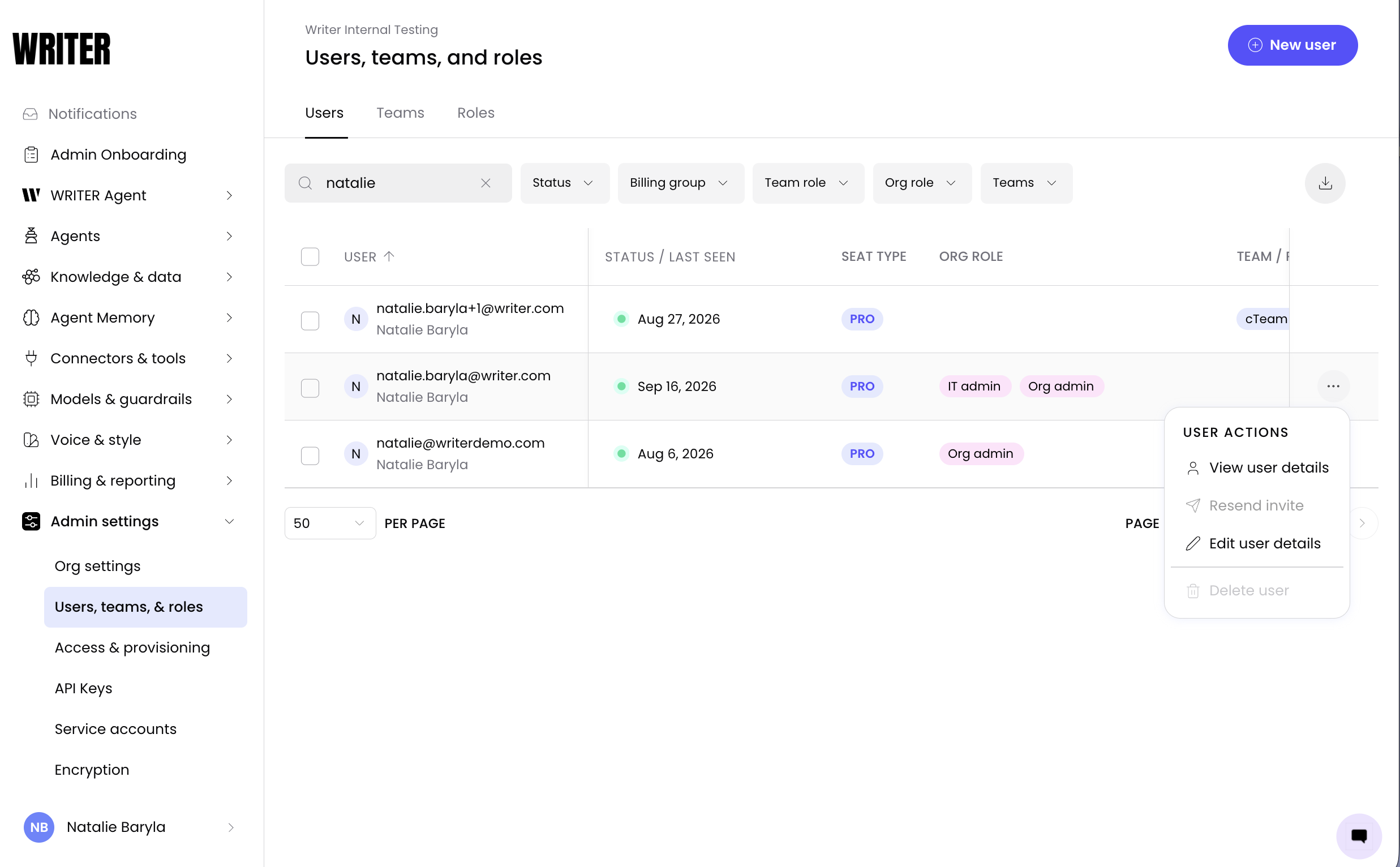
Navigate to AI Studio > Admin Settings > Users, teams & roles > users and locate the users you would to make a limited team member. Select Edit user details from the three dot menu on the right.
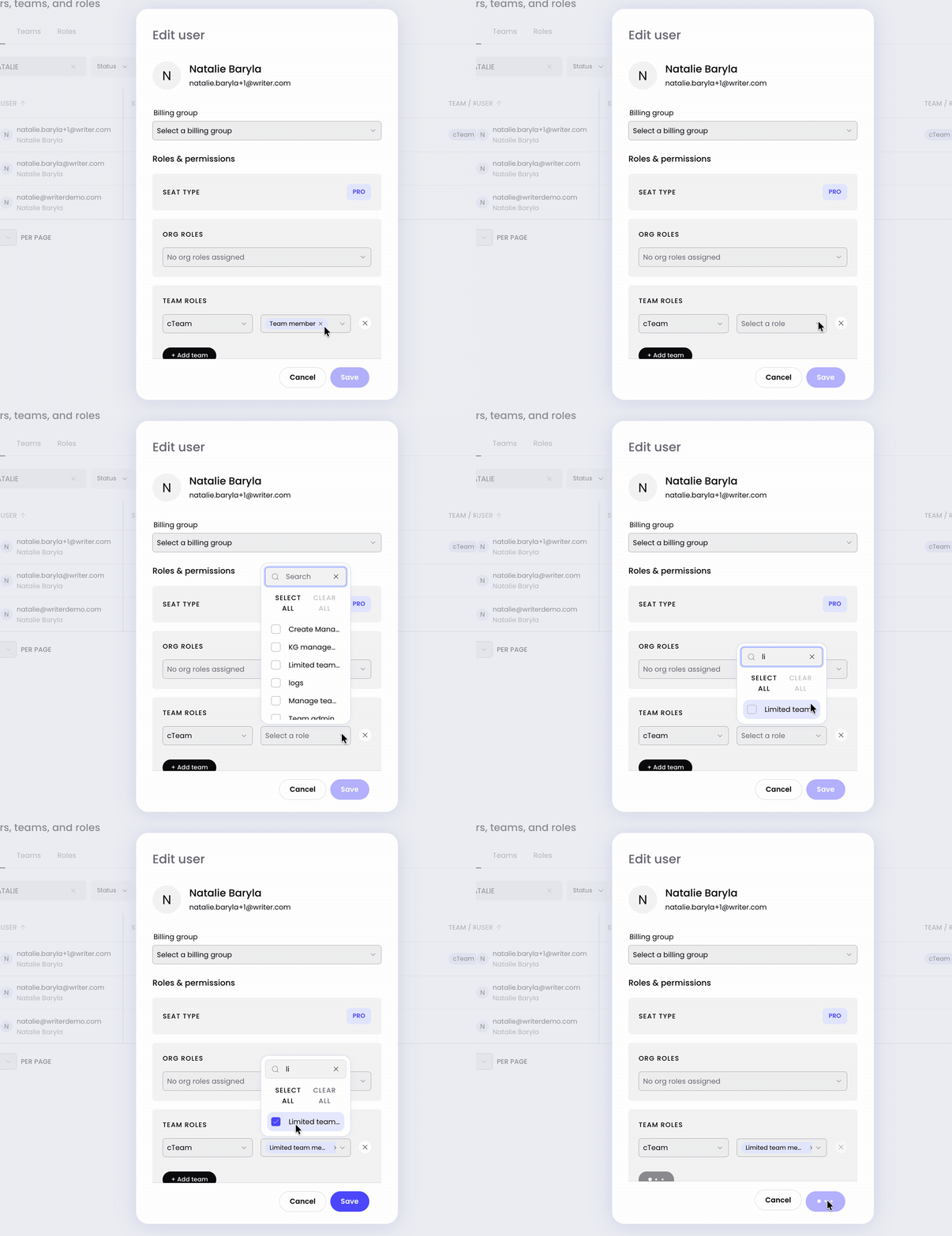
Remove the current team member role, add the limited team member role, and select Save. You'll see the user's role update to Limited team member in the members list. They can no longer create or share playbooks and skills, but their access to existing playbooks and skills are unchanged.
Tip: If you need to restrict playbook creation for many users at once, consider assigning the role automatically through domain access or SCIM IDP group mappings rather than updating each user individually.
📄 Setting up SCIM provisioning
Assigning the role automatically through domain access or SCIM
For organizations that don't want playbook and skill permissions granted by default, the limited team member role can be assigned automatically when users join. This is useful for governance-heavy deployments where the default team member role would otherwise grant creation and publishing access.
You can assign the role automatically through:
Domain access rules — users joining from an approved domain are assigned the limited role on provisioning.
SCIM IDP group mappings — users matched to a configured identity provider group are assigned the limited role on provisioning.
Important: Automatic assignment applies to newly provisioned users. To update existing users, reassign their role manually or trigger a re-sync from your identity provider.
Troubleshooting
A user with the limited role can still create playbooks and skills
Confirm the role change has been saved and that the user has refreshed their session. If the user was assigned the role through SCIM, trigger a re-sync from your identity provider to ensure the mapping has propagated. If the issue persists, verify that no additional role or permission override grants them creation access.
A user with the limited role can no longer run playbooks they used before
The limited role preserves existing playbook access. If a user loses access, check whether the playbook's sharing settings were changed separately, or whether the user was moved to a different Team with different playbook access.
FAQs
Who can assign the limited team member role?
Org admins can assign the role. Team admins and team members cannot change roles.
Can a limited team member still use playbooks?
Yes. Users with the limited role can view and run any playbook they already have access to. The role only removes the ability to create, publish, and share playbooks.
Can a limited team member still use skills?
Yes. Users with the limited role can view and use any skills they already have access to. The role only removes the ability to create and share skills.
Is the limited team member role the default for new users?
No. The existing Team member role remains the default unless an org admin explicitly configures a change. The limited role is opt-in.
Can I assign the limited role to many users at once?
Yes. You can assign the role automatically through domain access rules or SCIM IDP group mappings, which applies to users as they are provisioned. For existing users, update the role individually or trigger a re-sync from your identity provider.
What happens if I change a limited team member back to a regular team member?
The user regains the ability to create and share playbooks. Their existing playbook access is unchanged.